


 Michał Trybulec
Snowflake is often the place where analytical logic takes shape. Tables are joined, views are layered on top of each other, dynamic tables reshape data, and pipelines load and refresh datasets. As SQL complexity grows, understanding how data flows inside Snowflake becomes increasingly difficult.
Teams start asking questions like:
- Which Snowflake objects depend on this table or column?
- How is this value derived across views and dynamic tables?
- What will be affected if we change this SQL logic?
This is exactly the problem automatic data lineage in Snowflake is designed to solve.
In this article, you’ll learn:
- how automatic Snowflake data lineage works in Dataedo,
- which Snowflake objects and transformations are covered,
- what level of lineage (object-level vs column-level) is available,
- and how Snowflake lineage fits naturally into broader data flows - without losing focus on Snowflake itself.
What Is Automatic Data Lineage in Snowflake?
Automatic data lineage in Snowflake is the ability to automatically detect and visualize dependencies between Snowflake objects, based on real metadata and SQL definitions.
In Dataedo, Snowflake lineage is built by:
- importing Snowflake technical metadata,
- parsing SQL scripts for views, dynamic tables, and pipelines,
- using Snowflake system metadata and history views,
- and, where available, Snowflake native lineage functions.
The result is a living model of dependencies inside Snowflake, kept in sync as objects and SQL logic evolve.
Why Lineage Inside Snowflake Matters
Snowflake environments grow quickly and organically.
Over time, teams accumulate:
- layered views,
- reused SQL logic,
- derived columns defined inline,
- dynamic tables feeding reporting layers,
- ingestion processes using stages and pipelines.
Without lineage:
- dependencies are hidden,
- impact analysis becomes manual,
- debugging requires reverse-engineering SQL,
- changes introduce unnecessary risk.
Automatic lineage makes these dependencies explicit and visible, directly from Snowflake definitions.
Snowflake Lineage in Context (Without Losing Focus)
While this article focuses on lineage inside Snowflake, it’s worth noting that Snowflake rarely exists alone.
When Snowflake metadata is documented together with ETL and BI tools in Dataedo, the same lineage model can naturally extend beyond Snowflake - connecting database transformations with downstream datasets and reports.
This extension does not replace Snowflake lineage - it builds on top of it.
How Dataedo Builds Snowflake Lineage
Dataedo builds Snowflake lineage by combining multiple Snowflake-native metadata sources with its own SQL Analyzer.
Depending on the object type, available metadata, and permissions, lineage is created using:
- SQL parsing (Dataedo SQL Parser) for views, dynamic tables, and pipelines,
- INFORMATION_SCHEMA views for object-level dependencies,
- SNOWFLAKE.ACCOUNT_USAGE views for lineage related to data movement and usage history,
- GET_LINEAGE system function (available in Snowflake Enterprise Edition or higher).
In addition to metadata-based lineage, Dataedo also supports query-level lineage through the Snowflake Enterprise Lineage Connector.
This connector enriches the standard Snowflake lineage model by importing executed SQL queries (up to one year back) together with the column-level data lineage they produce inside Snowflake.
It supplements - not replaces - the regular Snowflake connector.
The recommended approach is:
- first, import Snowflake metadata using the standard Snowflake connector,
- then, enrich lineage using the Snowflake Enterprise Lineage connector to capture how data is actually moved and transformed by executed queries.
At the same time, Dataedo can document other layers of the analytics stack, including:
- source databases (e.g. SQL Server, PostgreSQL),
- ETL tools (e.g. SSIS),
- BI platforms (e.g. Power BI, SSAS, SSRS).
This allows Snowflake lineage to remain accurate and Snowflake-focused, while also being ready to connect into broader data flows when Snowflake objects are consumed downstream.
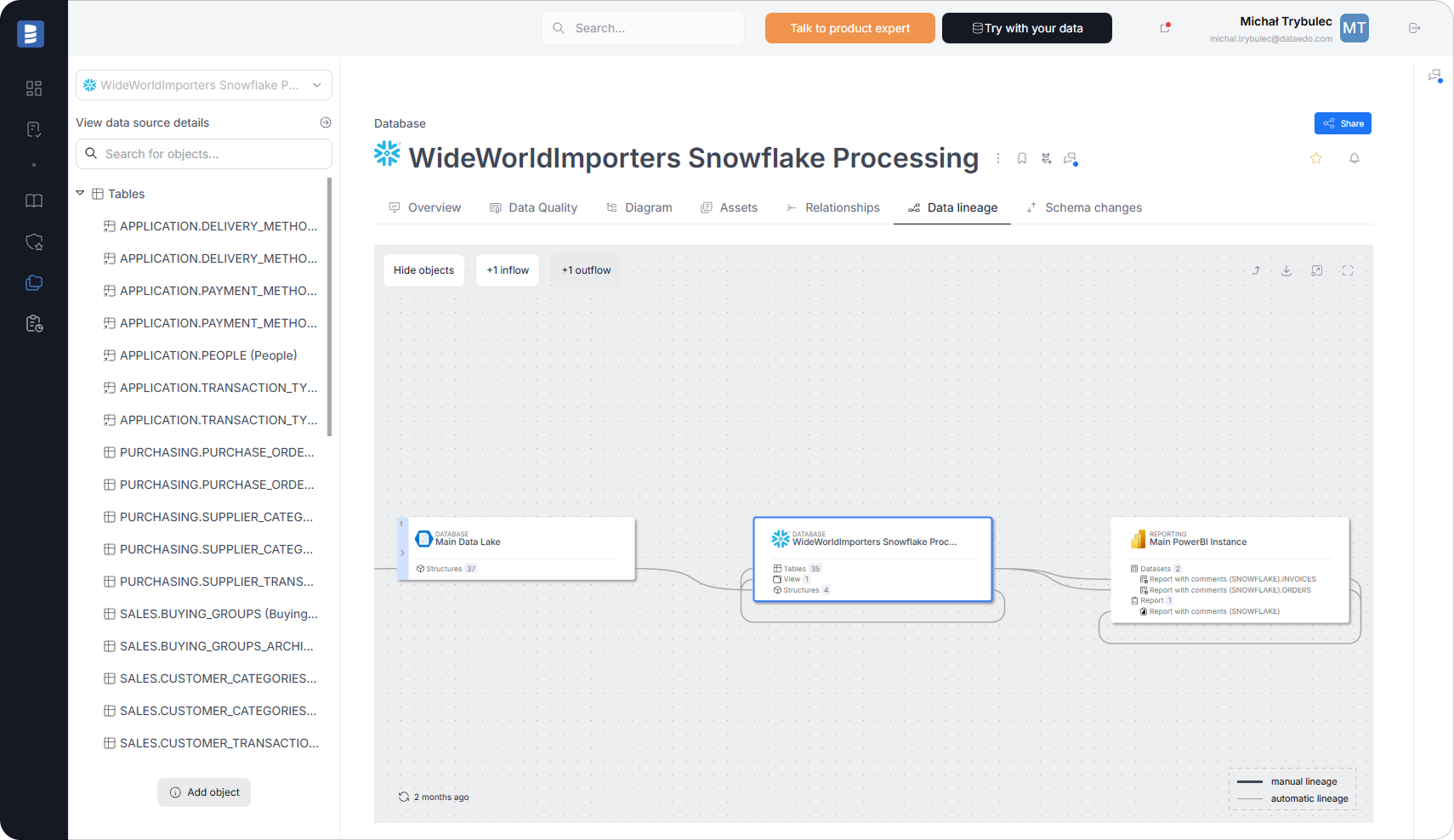
Lineage Coverage by Snowflake Object Type
Tables
For Snowflake tables, Dataedo builds lineage based on Snowflake-native lineage metadata.
Column-level and object-level lineage for tables is created using:
- the GET_LINEAGE system function (available in Snowflake Enterprise Edition or higher),
- supported Snowflake metadata views where applicable.
This allows teams to see:
- which tables feed a view,
- how views depend on other views,
- how columns are renamed, transformed, or derived.
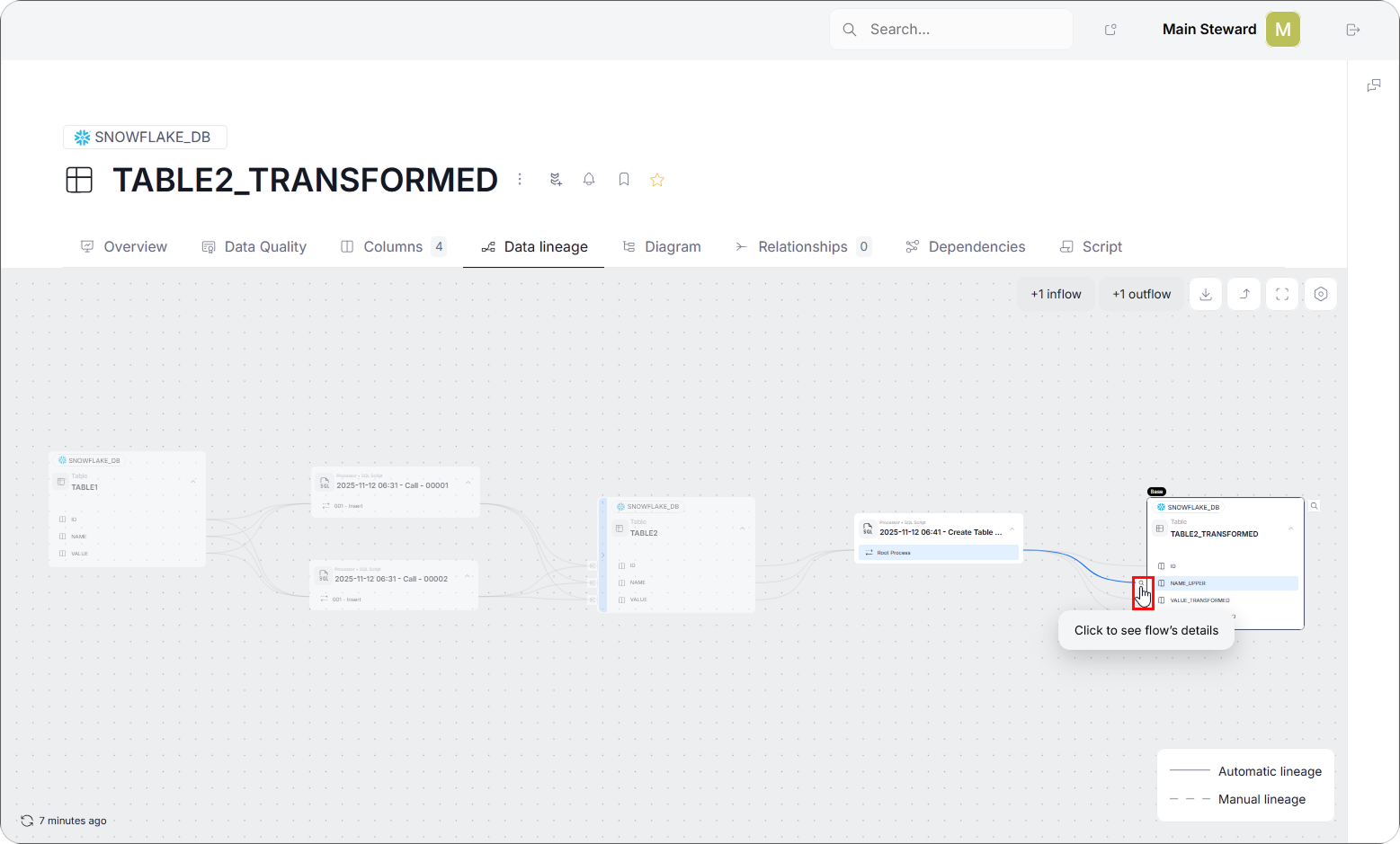
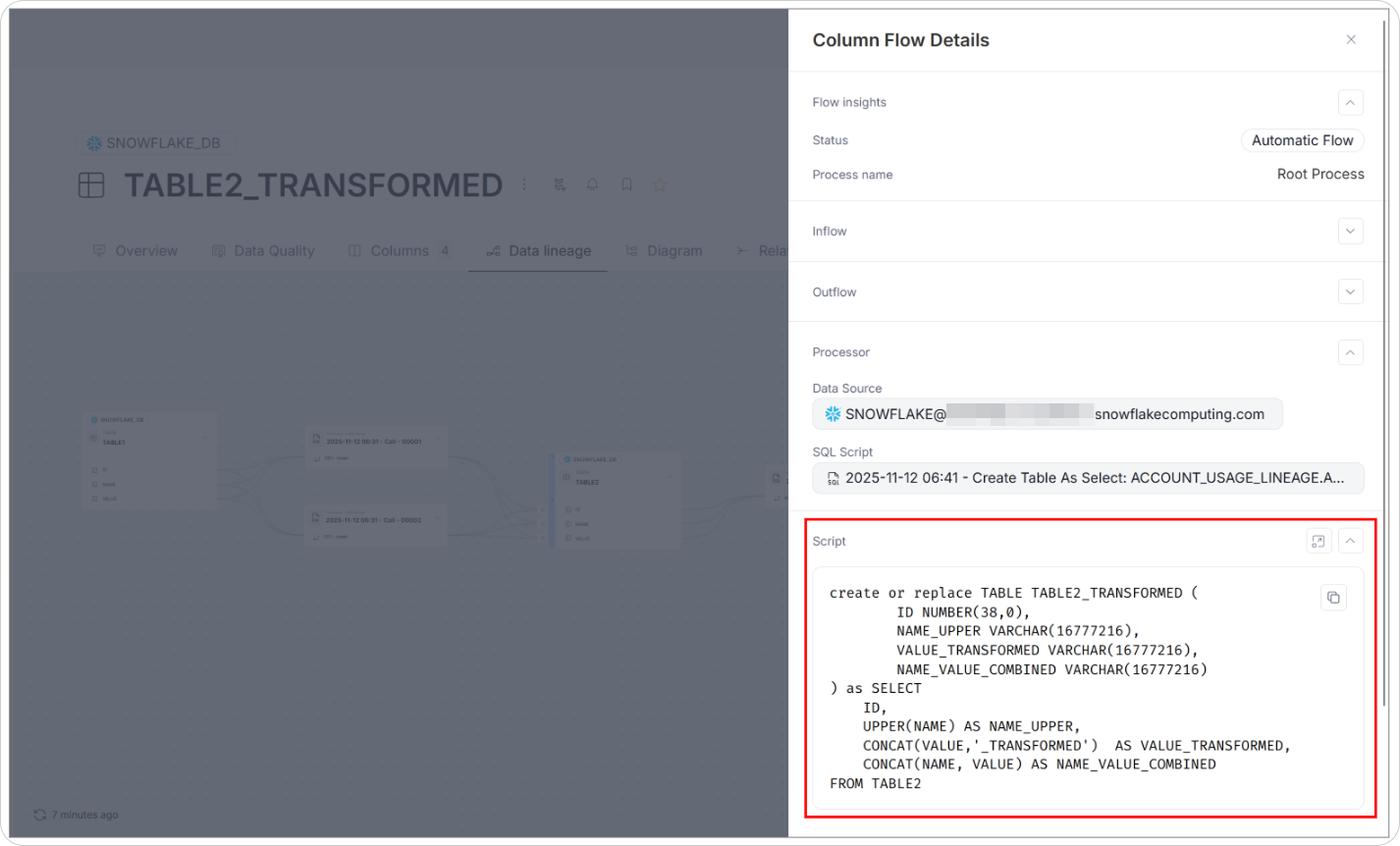
Column-Level Lineage for Views
For views and materialized views, Dataedo uses its SQL Analyzer to extract column-level lineage directly from the SQL script.
When available, Dataedo uses the GET_LINEAGE system function to retrieve column-level dependencies visible inside Snowflake.
This includes:
- column aliases,
- expressions,
- joins across multiple tables,
- derived columns.
Column-level lineage is essential for understanding analytical logic hidden inside Snowflake SQL.
Dynamic Tables
Dynamic tables are represented in Dataedo as Views (subtype: Dynamic table), reflecting how they behave in Snowflake.
Lineage is built using:
- SQL parsing for column-level lineage,
- INFORMATION_SCHEMA.DYNAMIC_TABLE_GRAPH_HISTORY() for object-level lineage.
- GET_LINEAGE for column-level lineage where available,
This makes it possible to understand how dynamic tables depend on upstream objects and how their columns are derived.
Stages, External Tables, Pipelines, and COPY INTO
For ingestion-related objects, Dataedo creates object-level lineage that shows how data enters and moves within Snowflake:
- External storage → Stages
- Stages → External tables
- Stages → Pipelines → Tables
- Stages → Tables (COPY INTO)
These flows provide visibility into Snowflake’s ingestion paths without over-interpreting transformation logic.
Streams
For streams, Dataedo supports column-level lineage based on Snowflake metadata.
Lineage shows how changes in a table or view are captured by a stream and propagated downstream.
Object-Level vs Column-Level Lineage in Snowflake
| Lineage Type | What It Shows | Typical Use |
| Object-level | Dependencies between Snowflake objects | Architecture understanding, ingestion paths |
| Column-level | Column propagation and transformations | Impact analysis, logic validation |
Both perspectives are required to fully understand Snowflake data flows.
From Snowflake Lineage to Impact Analysis
Snowflake lineage enables impact analysis within the Snowflake environment.
Teams can:
- start from a table, view, or column,
- identify dependent Snowflake objects,
- evaluate the effect of SQL or schema changes before deployment.
When Snowflake is documented together with downstream systems, the same lineage can be followed beyond the database - from Snowflake objects to the datasets and reports that consume them.
This extended visibility builds directly on accurate Snowflake lineage and does not replace it.
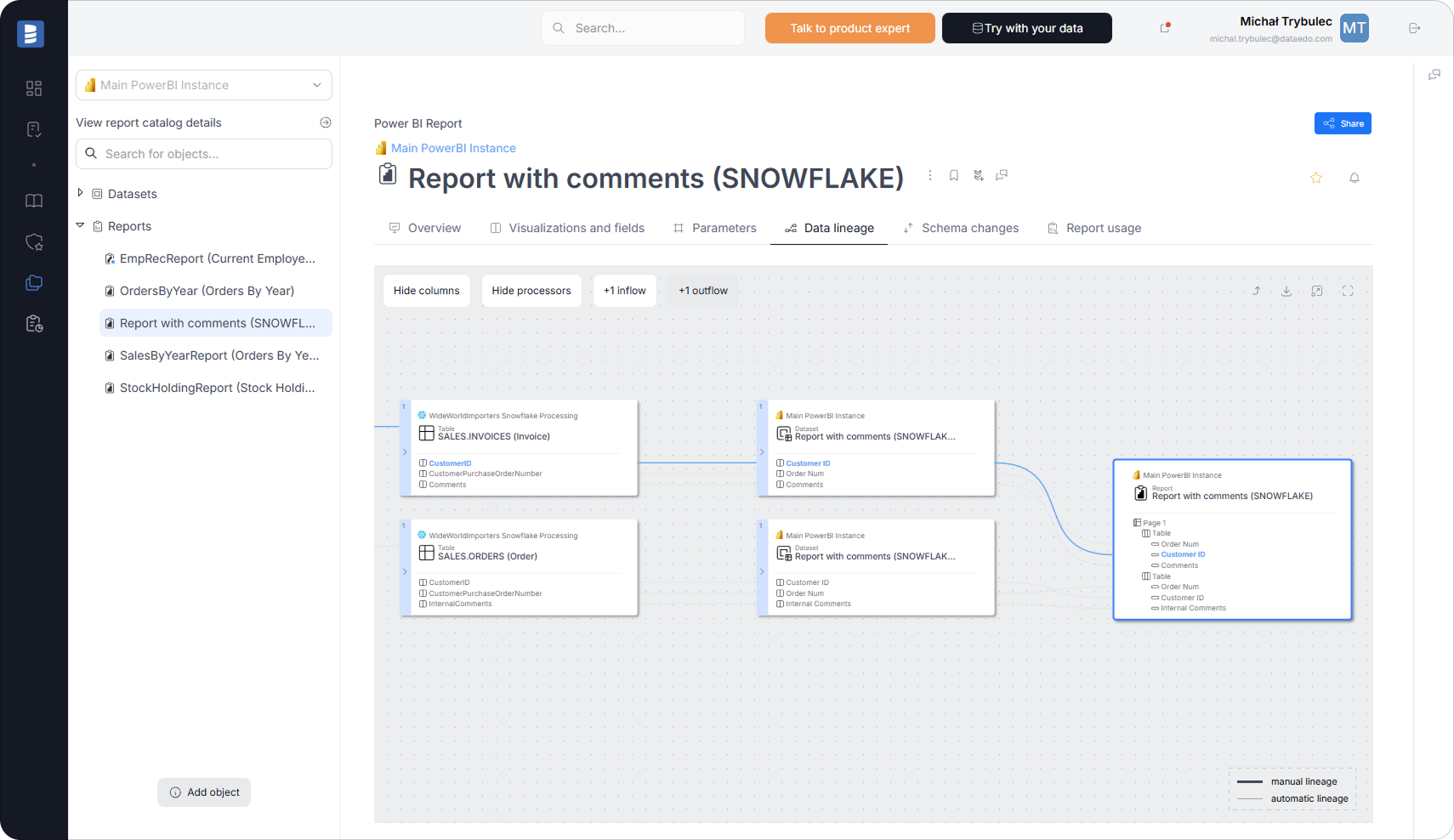
How Dataedo Helps Teams Work Safely with Snowflake
By automatically building and maintaining Snowflake lineage, Dataedo helps teams:
- understand complex SQL dependencies,
- perform reliable impact analysis,
- reduce risk when changing Snowflake logic,
- avoid relying on tribal knowledge,
- keep documentation aligned with reality.
Snowflake lineage becomes a practical, everyday tool - not static documentation.
Frequently Asked Questions About Snowflake Data Lineage
Does Snowflake data lineage in Dataedo require manual configuration?
No. Snowflake data lineage is generated automatically during metadata import. Dataedo builds lineage based on Snowflake system metadata, SQL definitions, and available lineage functions. No manual dependency mapping is required.
Is column-level lineage available for all Snowflake objects?
Column-level lineage is available where Snowflake metadata or SQL definitions expose column relationships.
In practice:
- Tables support column-level lineage via the GET_LINEAGE system function (available in Snowflake Enterprise Edition or higher) when data is written using SQL operations such as INSERT, UPDATE, or MERGE based on other Snowflake objects.
- Views and materialized views support column-level lineage via the GET_LINEAGE system function and SQL parsing of view definitions.
- Dynamic tables support column-level lineage via the GET_LINEAGE system function and SQL parsing of the dynamic table definition.
- Streams support column-level lineage based on Snowflake metadata.
- Ingestion paths (stages, pipelines, COPY INTO) are documented at object level.
This reflects how Snowflake itself exposes metadata for different object types.
How often is Snowflake lineage updated?
Lineage is refreshed whenever Snowflake metadata is re-imported into Dataedo. If SQL logic, object definitions, or dependencies change in Snowflake, re-running the import updates lineage to reflect the current state of the environment.
Does Snowflake lineage work without Enterprise Edition?
Basic lineage can be built using INFORMATION_SCHEMA and SQL parsing. Additional lineage sources, such as the GET_LINEAGE system function and ACCOUNT_USAGE views, require Snowflake Enterprise Edition (or higher) and appropriate permissions. When those sources are unavailable, Dataedo builds lineage from the metadata that is accessible.
Can Snowflake lineage be connected to BI and other analytics tools?
Yes. While this article focuses on lineage inside Snowflake, Snowflake objects documented in Dataedo can be connected to downstream ETL and BI systems when those platforms are documented as well.
This allows Snowflake lineage to extend naturally into broader data flows - without changing or replacing the Snowflake lineage model itself.
Is Snowflake lineage meant for documentation or day-to-day work?
Snowflake lineage in Dataedo is designed for everyday use. Teams use it to:
- understand SQL dependencies,
- perform impact analysis before changes,
- troubleshoot unexpected results,
- review and validate analytical logic.
Lineage is not static documentation - it reflects how data actually flows inside Snowflake.
Make Snowflake Data Flows Visible
Snowflake makes it easy to build analytical logic. Automatic data lineage makes that logic understandable.
See how Dataedo automatically builds data lineage in Snowflake and keeps dependencies transparent.
Book a demo or start a free trial to explore Snowflake lineage in practice.