 Support


Join 1000+ Satisfied Customers Using Dataedo
















Enable safe self-service analytics
Business users want faster access to data, but IT worries they'll misuse it, query the wrong tables, or violate security policies. Dataedo gives users a searchable catalog with clear definitions and usage guidance, so they can work independently while sensitive data stays protected.
The challenge

Slow data access
Business users wait days for IT teams to provide access or answer basic data questions.
Repeated IT requests
IT teams spend hours answering repetitive "where is this data?" questions.
Risky database access
Direct access to databases increases security risks and leads to incorrect data usage.
Poor data understanding
Lack of documentation leads to confusion, misinterpretation, and inaccurate analysis.
How Dataedo helps
Publish a searchable catalog without database access
Use the Dataedo Web Portal to give business users a searchable catalog of tables, columns, and metrics. They can explore what's available without touching production databases.

Explain data in business language
Use Business Glossary and rich documentation to explain metrics, definitions, and usage guidelines in plain language. Help users understand what data means and how to use it correctly.

Show what's safe to use vs. restricted
Use classification tags and custom fields to mark which data is approved for self-service and which requires special access. Guide users toward the right datasets.

Reduce IT support burden
Let users find answers in the catalog instead of asking IT. Free up data engineers and DBAs to work on strategic projects instead of answering repetitive questions.

What you get

Faster analytics
Business users find and understand data in minutes instead of waiting days for IT support.
Reduced support burden
IT teams spend less time answering repetitive data location and usage questions.
Improved data security
Users can discover and understand data without requiring broad or risky database access.
Key features
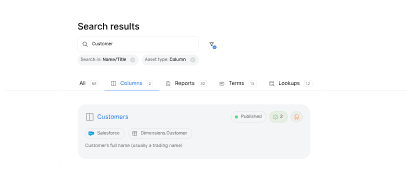
Data Catalog
Provide a searchable, user-friendly catalog that makes data assets easy to find, understand, and use across the organization.

Business Glossary
Centralize definitions of business terms so users can understand datasets, metrics, and fields quickly, enabling accurate self-service analytics without IT help.
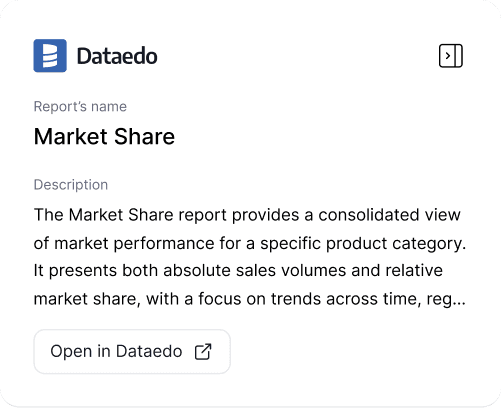
Browser Extension
See information from the catalog directly inside your Power BI and Tableau dashboards and reports.
FAQs
What is self-service analytics?
Self-service analytics lets business users explore, analyze, and visualize data on their own, without waiting for IT or data teams to create reports. It empowers teams to make faster, data-driven decisions while reducing bottlenecks. However, it only works when users can easily find, understand, and trust the data they’re using.
How does a data catalog enable self-service analytics?
A data catalog like Dataedo organizes datasets, documentation, and business definitions in one searchable location, helping users quickly find trusted data without needing direct database expertise.
How do we prevent "data chaos" when opening access to non-technical users?
The biggest risk is users misinterpreting raw data. Dataedo solves this by providing comprehensive documentation. We translate complex SQL table names into plain English definitions. This ensures that a "Customer ID" means the same thing to your sales team as it does to your accounting department, maintaining a single version of truth across your global offices.
Who benefits from self-service analytics?
Business analysts, finance teams, marketing teams, product managers, and executives all benefit by gaining faster access to reliable data insights.
How much time can our IT team save with a data catalog?
IT and Data Engineering teams spend a significant percentage of their time answering repetitive questions like "Where is the revenue column?" or "What does this status code mean?" Dataedo acts as a 24/7 automated support desk, allowing your technical staff to focus on high-value architecture instead of basic data discovery.
Why our customers love Dataedo?
Dataedo is a lightweight solution with great customer service and active product development (recently data quality). The ability to run SQL scripts on the repository brings additional flexibility.

We jump started all of our Data Governance efforts using the tool. We documented key databases quickly and easily and published the information to our analyst community. The Dataedo team is dream to work with and very responsive.

Dataedo is easy to use, offers great functionality, and provides excellent customer service that always listens to the customer.

Dataedo is an amazing tool that continues to grow and improve.

Dataedo excels at data cataloging, and the support from the Dataedo team is top-notch.

Datedo consistently improves while delivering exceptional support that is quick, competent, and highly reliable.

Dataedo provides ease of use and covers so many areas from a Data Governance perspective. You really can put everythng in one place.

Dataedo is a fantastic tool, and I love working with it—especially with the continuous improvements being made and planned.


Piotr Kononow
Founder
Let business users find data without IT bottlenecks
Explore Dataedo through a preconfigured data catalog with sample data, try it with your own data during a 14-day free trial, or book a demo.