


 Michał Trybulec
(Complete step-by-step guide with realistic examples from a typical daily ETL between operational DB → data warehouse)
If you're looking for a practical, modern, and scalable way to document SSIS packages, this guide is for you. Whether you're working with simple ETL jobs or a full daily warehouse load consisting of dimensions, facts, and incremental source updates, proper SSIS documentation is essential.
This guide walks you through what to document, how to document it, and how to automate metadata extraction using examples from a typical daily ETL pipeline moving data from an operational system into a data warehouse. Along the way, you’ll see how a metadata catalog like Dataedo helps centralize context, expose lineage, and make SSIS processes transparent for engineering, BI, and governance teams.
Why SSIS Documentation Matters
Even a well-structured daily ETL ends up containing:
- many packages,
- several staging layers,
- complex data flows with lookups and derivations,
- dependencies across source systems, warehouse tables, and BI reports.
Without documentation, teams face predictable issues:
- Opaque logic – “How is the Customer dimension built?”
- No lineage – “What happens if we rename this column in the operational DB?”
- Hard troubleshooting – “Why is Fact Sales missing yesterday’s data?”
- Missing ownership – “Who maintains this package?”
- Slow onboarding – new developers spend days reverse-engineering logic.
Good documentation turns ETL into a predictable, transparent, maintainable process — and makes it far easier to collaborate across engineering, data warehousing, and BI teams.
What to Document in SSIS (with Real ETL Examples)
A complete SSIS documentation set covers:
1. Package-Level Metadata
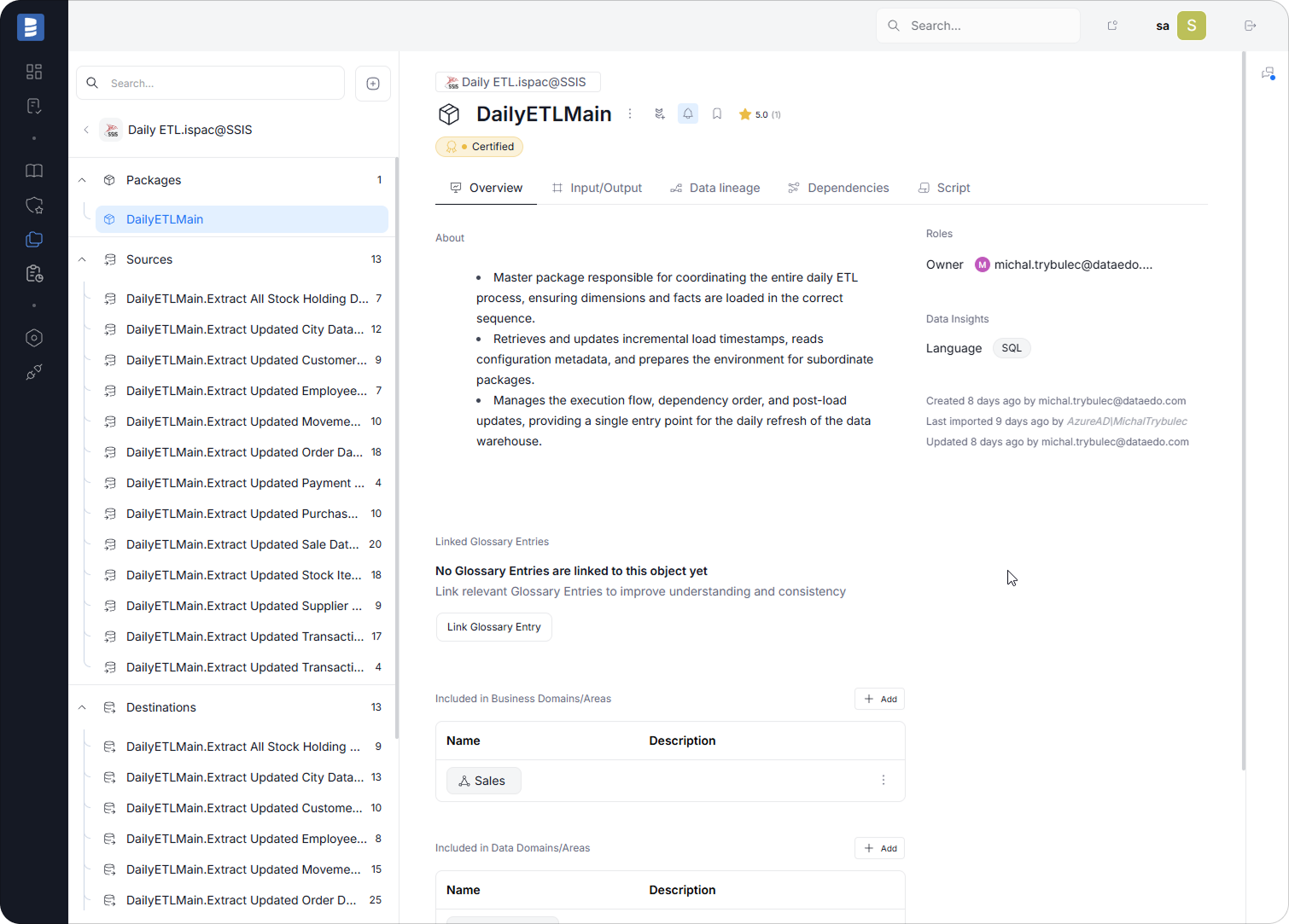
Well-structured SSIS documentation begins at the package level. This is where you capture the business purpose, execution logic, and operational context that explain how a package fits into the broader ETL workflow. Clear package-level metadata helps new developers understand the process quickly, simplifies troubleshooting when loads fail, and makes impact analysis easier whenever source systems or downstream warehouse objects change.
Example: Package DailyETLMain.dtsx
Document:
- Purpose: Coordinates the full daily ETL cycle, executing all dimension and fact load packages in the correct order. Ensures the warehouse is refreshed with the latest operational data.
- Frequency: Runs once per day as part of the scheduled nightly processing window.
- Source: Reads metadata, timestamps, and configuration from operational and warehouse control tables.
- Destination: Triggers dimension and fact load packages that populate core warehouse tables.
- Incremental rule: Retrieves and updates global load watermarks used by subordinate packages.
- Dependencies:
- stored procedure that returns the last successful load timestamp
- execution of dimension-load packages before fact-load packages
These elements establish the foundation for downstream documentation, especially when analyzing lineage, dependencies, and governance across the entire ETL pipeline.
2. Control Flow Documentation
Control Flow captures the high-level logic of the package — the order of tasks, branching, error handling, retry policies, and orchestration of dimension and fact loads. This is where readers learn how the package executes, in what sequence, and under what conditions. Clear documentation helps teams understand execution logic without digging through every internal SSIS task.
Example: Daily ETL master package
- Execute SQL Task – read last load info from metadata table
- Sequence Container – Load Dimensions
- Load_DimCity
- Load_DimCustomer
- Load_DimStockItem
- Sequence Container – Load Facts
- Load_FactSales
- Load_FactMovement
- Execute SQL Task – update load timestamp
Document:
- the main tasks
- their business purpose
- error paths and retry logic
- branching logic
- loops or containers
Note:
A metadata tool like Dataedo focuses on documenting data structures and flows — not operational tasks such as “Send Mail” or execution history like run timestamps. Those are handled by SSISDB, SQL Agent, or monitoring systems.
Dataedo’s role begins where data moves.
3. Data Flow Documentation
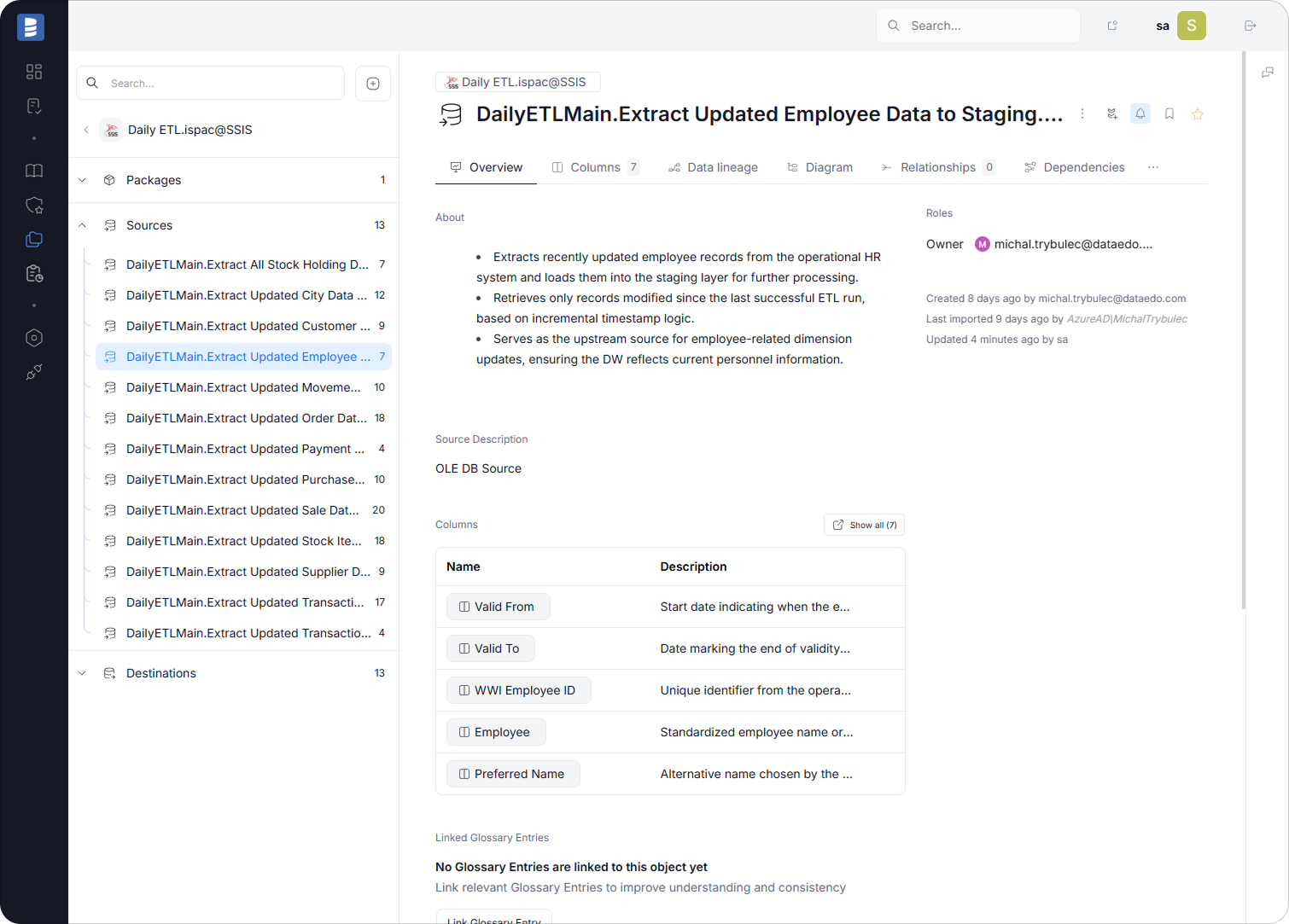
Data Flows are the core of SSIS workloads. This is where data is extracted, shaped, enriched, and loaded — and where most business rules live. Documenting Data Flow logic brings clarity to transformations and simplifies debugging and lineage tracing.
Example: Data Flow in Load_DimCustomer
Source:
SELECT * FROM Application.Customers WHERE LastModifiedDate > ?
Transformations:
- Lookup CityKey from Dimension.City
- Derived Columns:
- FullName = FirstName + ' ' + LastName
- Status = (IsActive == 1) ? 'Active' : 'Inactive'
Destination:
Dimension.Customer
Column Mapping Example
| Source Column | Transformation | Target Column |
| CustomerID | direct | CustomerKey (DW) |
| FirstName + LastName | Derived Column | FullName |
| CityID | Lookup → CityKey | CityKey |
| LastModifiedDate | direct | LastUpdatedDate |
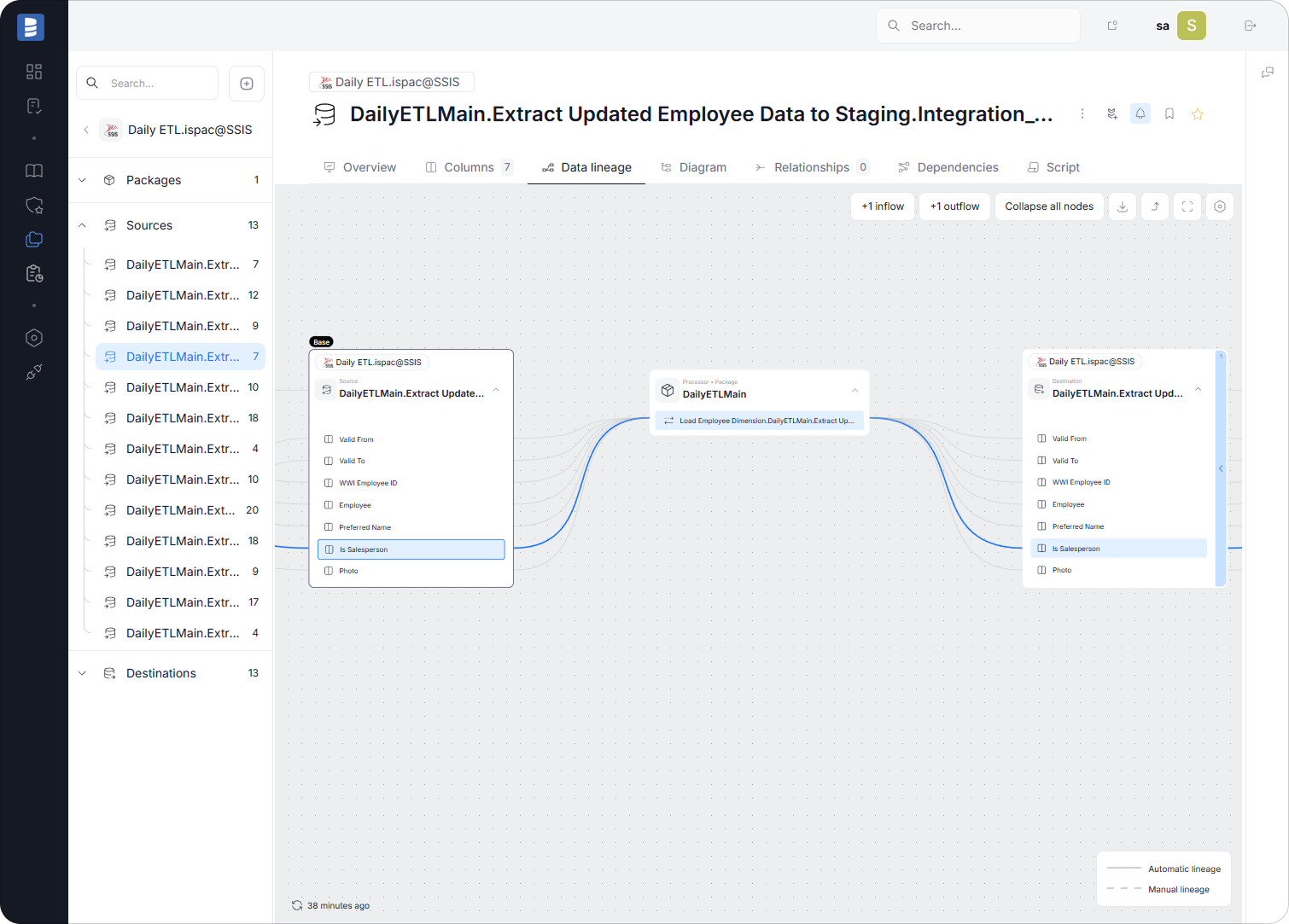
Documenting column-level logic is especially useful because lineage tools (such as Dataedo) can automatically detect and visualize how fields move through the ETL.
4. Variables, Parameters & Expressions
Variables often control incremental logic, file paths, timestamps, or environment-specific settings.
Documenting them avoids hidden logic.
Example variables
| Variable | Purpose |
| User::CustomerMaxModified | incremental load watermark |
| User::LoadDate | DW load timestamp |
| User::SourceFolder | path for CSV-based loads |
Document:
- variable name
- scope
- data type
- default value
- how it is used in tasks or expressions
This helps developers understand package behavior without scanning every component manually.
5. Connection Managers
Documenting connection managers is essential for understanding where data originates and where it lands. Each connection defines a critical integration point between your ETL and the underlying data platforms, so capturing this information helps prevent confusion when environments change, new developers join the team, or authentication rules evolve.
Document:
- source connection (operational system)
- destination connection (data warehouse)
- environment overrides (DEV/TEST/PROD)
Example
- OperationalDB_Conn → connects to OLTP system
- DW_Conn → connects to the data warehouse
Note:
Documenting connection managers also pairs naturally with documenting the databases themselves. Because Dataedo is designed not only for SSIS but also for database documentation, it lets you capture:
- full schema details of the source and target databases,
- table and column descriptions,
- foreign keys and relationships,
- sensitivity markings,
- business glossary terms linked to fields,
- lineage between database objects and SSIS components.
This means you don’t just document the SSIS package — you document the entire ecosystem it interacts with, making Dataedo ideal for end-to-end metadata visibility across ETL and database layers.
6. SQL → SSIS → DW → BI Lineage
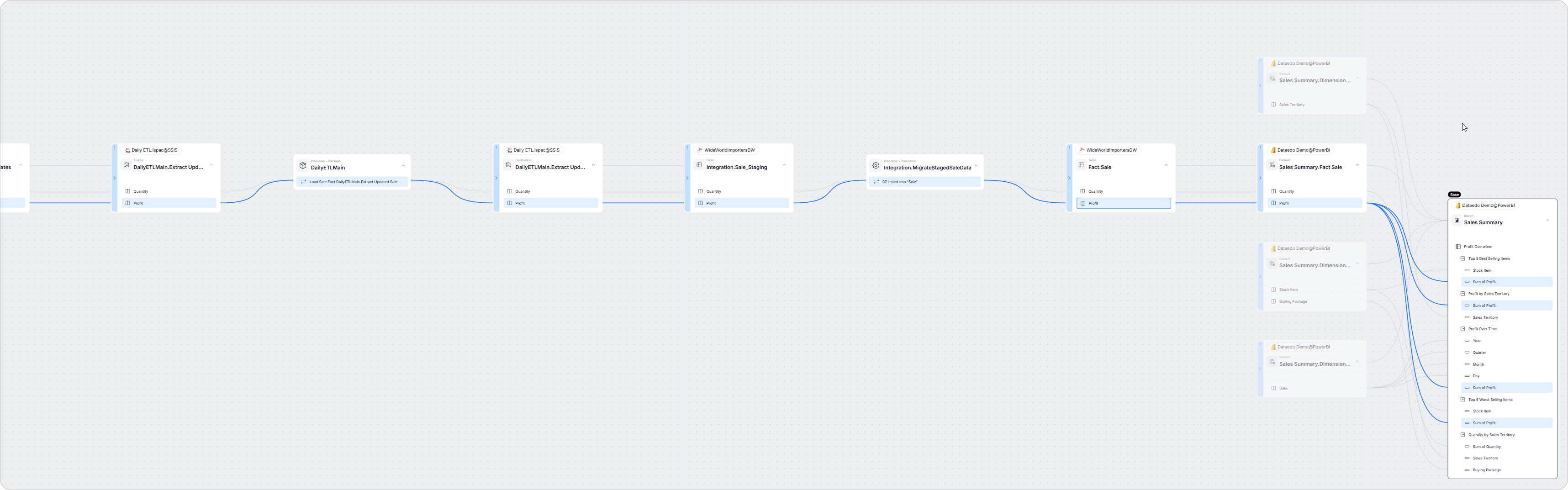
Lineage ties everything together by showing how data fields move across the entire analytics stack — from a value displayed in a BI report, through the dataset and warehouse table, back into the SSIS transformations that produced it, and ultimately into the original SQL Server source column. It provides the context needed to understand where a number comes from and which ETL components influence it.
Example lineage: Sum of Profit → Profit (DW) → SSIS ETL → SQL source
A typical end-to-end flow looks like this:
Power BI Report
→ field Sum of Profit
→ dataset / semantic model (field Profit)
→ data warehouse table (e.g., Fact.Sale.Profit)
→ populated by SSIS in the fact load package
→ sourced from SQL Server transactional data (e.g., Sales.Invoices or a similar operational table)
This kind of lineage shows exactly how the Profit value displayed in the report is produced, which transformations SSIS applies, and which SQL source columns contribute to the final calculation.
Why this matters
With clear lineage in place, teams can quickly answer questions such as:
- Which SSIS packages load the data behind the Profit field?
- Which SQL source column is used to compute Profit?
- What transformations does SSIS apply before loading it into the warehouse?
- What breaks if we rename or modify a column in the operational system?
- Which BI reports and measures depend on this field?
This makes the entire ecosystem easier to maintain, debug, and evolve safely.
How Dataedo helps
Dataedo automatically maps these flows and links:
Power BI report → dataset field → DW column → SSIS transformation → SQL source column
As a result, you get a complete, visual, searchable lineage that lets you trace a value like Sum of Profit all the way back to its origin and understand every step in between.
This eliminates guesswork, speeds up troubleshooting, and provides reliable impact analysis whenever something changes in the source system, ETL logic, or semantic model.
How Dataedo Helps Document SSIS (Integrated Throughout the Process)
Instead of documenting packages manually, Dataedo pulls metadata directly from SSIS and gives teams a unified view of their ETL.
1. Automated metadata capture
Dataedo imports packages, tasks, mappings, and connection metadata across the entire ETL.
2. Column-level lineage SQL → SSIS → DW → BI
Dataedo builds complete lineage, showing how fields move from source columns through SSIS transformations into warehouse tables and BI models.
3. Business glossary integration
Key business definitions (Active Customer, Net Sales, Gross Profit) can be linked to SSIS transformations and DW fields — ensuring consistent meaning across ETL and BI.
4. Governance & ownership
Assign owners, stewards, sensitivity labels, refresh rules, and quality notes to packages and data assets.
5. Publish documentation
Share your documented ETL as a web Portal.
Example Scenarios Where Documentation Pays Off
- Customer dimension issue - A source-system column change is easy to evaluate because lineage shows every SSIS component and report that depends on it.
- Fact Sales failure - Tracing the path from invoices → ETL → DW identifies where the breakdown occurred.
- Compliance audits - Auditors can follow sensitive data from source to report with full transparency.
- Modernization projects - Documentation forms the foundation for migrating SSIS workloads to cloud ETL or Data Factory.
Mini Tutorial: Start SSIS Documentation with Dataedo
- Connect Dataedo to SSIS - Import files or connect to SSIS Catalog.
- Auto-extract metadata - Packages, control flows, data flows, mappings.
- Add business context - Purpose, descriptions, owners, glossary terms.
- Review lineage - Visualize SQL → SSIS → DW flows.
- Publish - Share documentation with engineering, BI, and compliance teams.
Build a Discoverable, Governed SSIS ETL with Dataedo
Document your SSIS packages, track SQL → SSIS → DW lineage, and enrich everything with business context — all automatically.
Book a demo or start a free trial to make your SSIS ecosystem transparent, maintainable, and trusted.