


 Michał Trybulec
SQL Server Integration Services (SSIS) remains one of the most widely used ETL tools in enterprise environments. Its flexibility, performance, and native integration with SQL Server make it ideal for building daily warehouse loads, complex transformations, and data integration pipelines across operational systems.
As SSIS environments grow over time - more packages, more data sources, more transformations - one problem becomes unavoidable:
Nobody knows exactly where the data is coming from, how it is transformed, or what depends on it.
Teams start asking questions like:
- Where does this field come from?
- Which package loads this dimension?
- What breaks if we change this SQL column?
- How was this business metric calculated?
- Which BI reports rely on this ETL output?
These are all data lineage questions.
This guide explains what SSIS data lineage is, why it matters, how to document it, and how to automate lineage end-to-end using a dedicated SSIS data lineage tool such as Dataedo.
1. What Is Data Lineage in SSIS?
Data lineage describes the journey of data:
from its point of origin → through SSIS transformations → into the data warehouse → and finally into BI reports.
In the context of SSIS, lineage includes:
Source Lineage
Which tables, views, or queries are used as input?
Example:
Application.Customers.CustomerID feeds a Data Flow that loads the Customer dimension.
Transformation Lineage
How data is shaped or enriched inside SSIS?
Examples:
- Lookup: CityID → CityKey
- Derived Column: FullName = FirstName + ' ' + LastName
- Conditional Split: separate active vs inactive customers
- Aggregation: sales totals
- Data type conversions
- Key mapping and surrogate key assignments
Target Lineage
Where is the data written?
Examples:
- Staging tables
- Dimensions (Dimension.Customer)
- Facts (Fact.Sales)
- Intermediate files or audit tables
Downstream Lineage
Once loaded into the warehouse, the data continues its journey:
- semantic models and datasets
- BI measures
- visuals in Power BI reports
- user dashboards
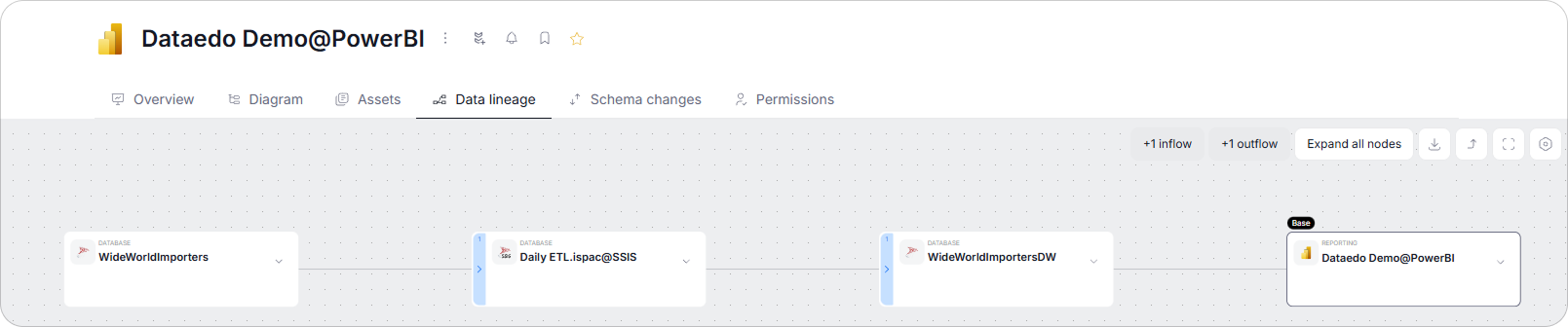
Putting these layers together gives you a complete end-to-end view:
SQL → SSIS → Data Warehouse → BI
This is the essence of SSIS data lineage.
2. Why SSIS Data Lineage Matters
As SSIS environments mature, data lineage becomes essential for understanding dependencies and reducing risk.
Impact Analysis
Without lineage, even small schema changes are dangerous.
Before renaming a column or changing its data type, teams need to know:
- which SSIS packages reference the column
- which data warehouse tables depend on it
- which BI reports consume the affected data
Lineage makes impact analysis fast and reliable.
Troubleshooting & Data Quality
When data issues appear in facts or dimensions, lineage helps trace problems end to end:
- which SSIS package loaded the data
- which transformations modified it
- which source rows were read
- where a lookup or mapping may have failed
Instead of guessing, teams can pinpoint the exact failure point.
Governance & Ownership
Data lineage is foundational for governance.
It answers key questions such as:
- how sensitive data flows through ETL
- who owns each part of the pipeline
- where business-critical metrics are calculated
This visibility is essential for compliance and accountability.
Documentation, Onboarding & Knowledge Sharing
Without lineage, new team members spend days reverse-engineering ETL logic.
Documented lineage provides:
- clarity and transparency
- shared understanding of transformations
- faster onboarding for engineers and analysts
Modernization & Migration
When migrating from SSIS to Azure Data Factory, Synapse, or Fabric, lineage becomes a blueprint of the existing ETL:
- shows end-to-end dependencies
- identifies reusable logic
- highlights transformations that must be preserved
Without lineage, modernization efforts turn into guesswork.
3. Why SSIS Lineage Is Hard to Trace Manually
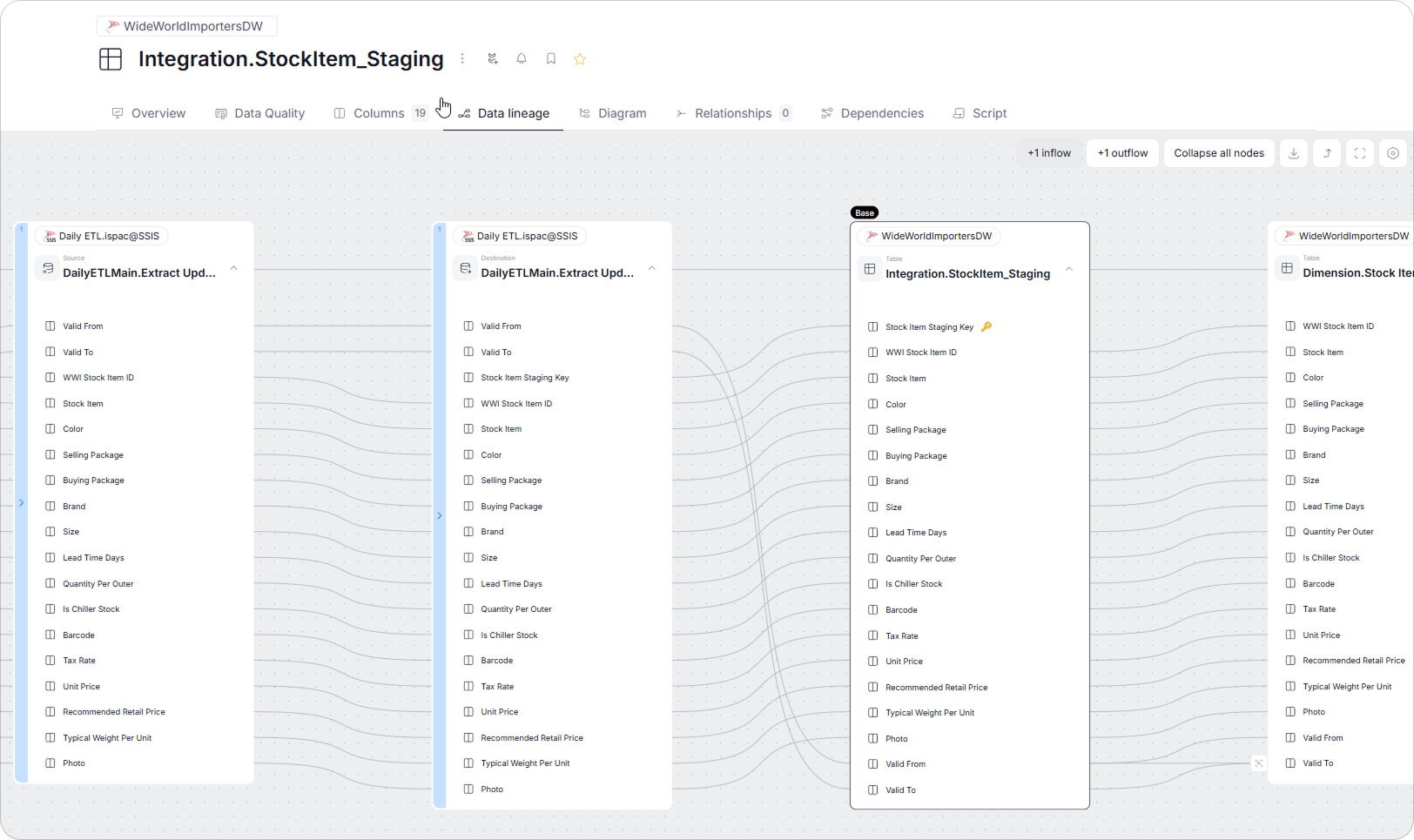
SSIS is powerful, but it does not expose lineage natively. Challenges include:
No built-in lineage viewer
SSIS Designer shows Data Flows, but:
- no cross-package lineage
- no column-level mapping across transformations
- no SQL → SSIS → DW → BI visibility
Large, interconnected ETL environments
A typical nightly load might include:
- dozens of data flows
- complex branching
- lookup chains
- multiple staging layers
- incremental logic driven by parameters
- multiple packages updating the same table
Understanding this manually is nearly impossible.
Cross-system dependencies
Lineage involves:
- SQL source
- SSIS
- warehouse tables
- BI models
This requires a tool that connects all these layers.
This is why organizations use automated SSIS data lineage tools like Dataedo.
4. Practical SSIS Lineage Example
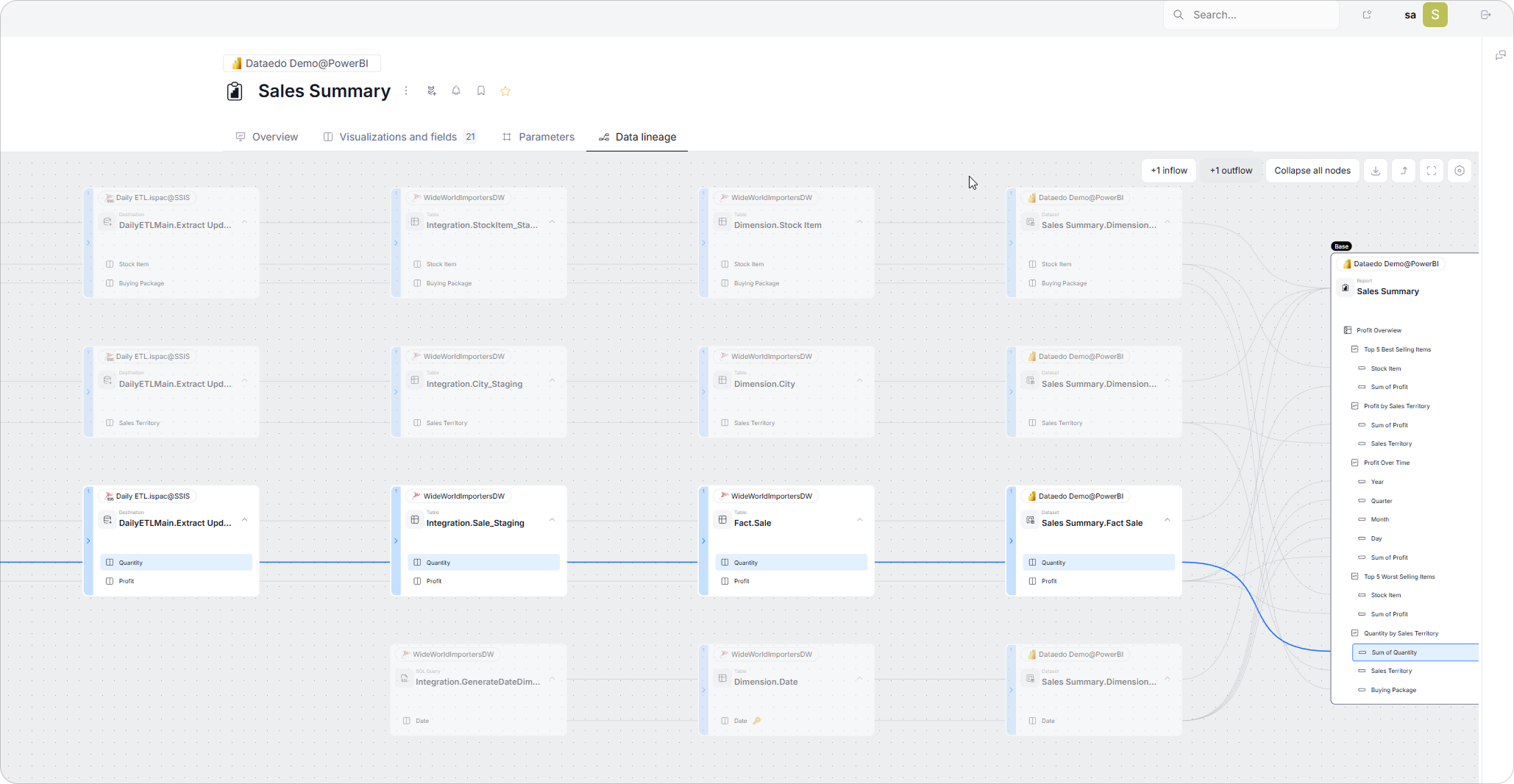
Consider a report displaying:
Power BI visual: Sum of Profit
Where does Profit come from?
Below is a typical lineage chain:
Power BI Layer
- Measure: Sum of Profit
- Uses dataset field: Profit
Dataset Layer
- Column: Fact.Sales.Profit
Data Warehouse Layer
- Fact table: Fact.Sales
- Profit = SalesAmount - TotalCost
SSIS Layer
Derived Column transformation:
Profit = SalesAmount - TotalCost
Lookups:
- map CustomerID → CustomerKey
- map StockItemID → StockItemKey
Incremental logic based on LastModifiedDate.
SQL Source Layer
Reads from:
- Sales.Invoices
- Sales.InvoiceLines
- Warehouse.StockItems
What lineage answers for Profit
- Which SQL tables are used to compute Profit?
- What transformations (derived columns) happen in SSIS?
- Which DW tables and columns store Profit?
- Which BI fields and visuals depend on it?
- What breaks if someone changes SalesAmount data type?
Only a lineage tool can show this full chain.
5. Why Manual Lineage Mapping Fails
Manual lineage mapping does not scale in growing SSIS environments. As pipelines evolve, documentation quickly becomes outdated and no longer reflects how data actually flows.
It fails because:
- ETL logic changes frequently
- dependencies span many packages and systems
- relationships between sources and targets are not explicit
- downstream BI models evolve independently
- static documentation falls out of sync almost immediately
Automation is the only sustainable way to maintain accurate SSIS data lineage.
6. What an SSIS Data Lineage Tool Should Provide
When evaluating lineage tools, look for:
✔ automated extraction of SSIS metadata
✔ column-level transformation lineage
✔ SQL → SSIS → DW → BI mapping
✔ cross-package dependency visualization
✔ ability to document both SSIS and the underlying databases
✔ business glossary integration
✔ ownership and governance metadata
✔ web-based sharing
This is the feature set needed for enterprise-level SSIS lineage.
7. How Dataedo Works as an SSIS Data Lineage Tool
Dataedo provides everything required to document SSIS and extract lineage automatically.
1. Automated Metadata & Transformation Extraction
Dataedo automatically reads SSIS packages and extracts:
- data flows and components
- expressions and variables
- source and target tables and columns
Transformations are captured at the column level, ensuring documentation stays aligned with the actual SSIS code.
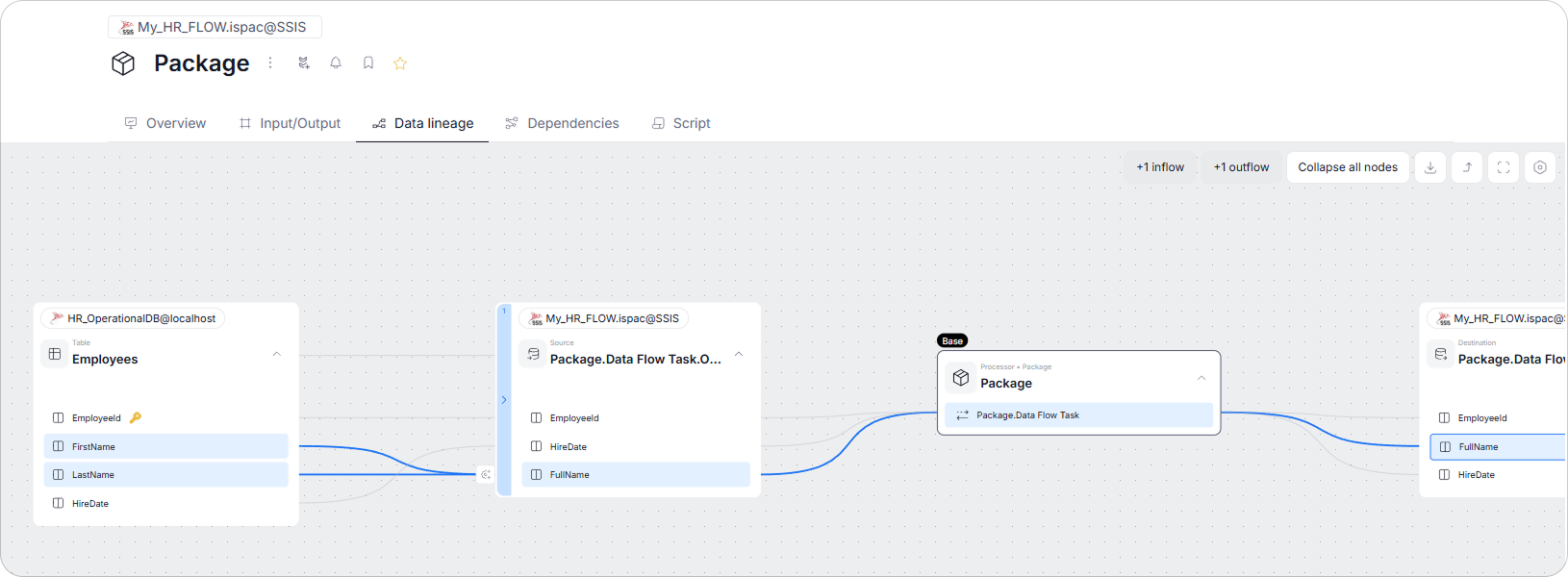
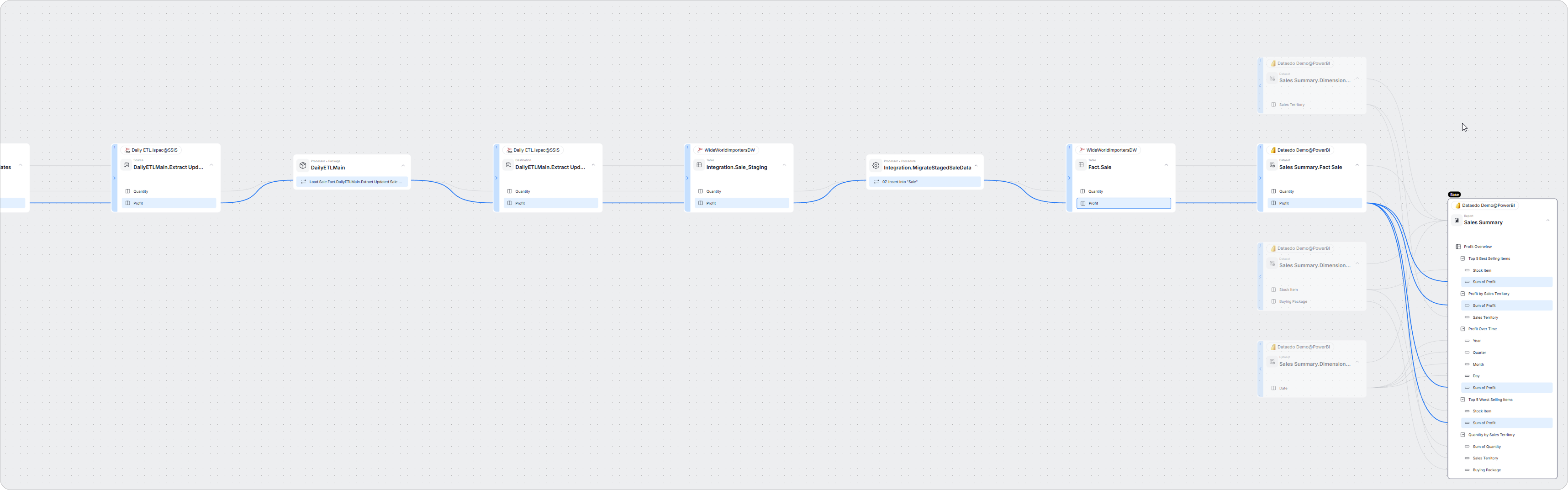
2. End-to-End Lineage: SQL → SSIS → DW → BI
Dataedo links all layers:
- SQL source columns
- SSIS components
- DW columns
- BI datasets and measures
You can start from a BI field (e.g., Profit) and trace it back through ETL to the original SQL record.
3. Unified Documentation for Databases, SSIS, and BI
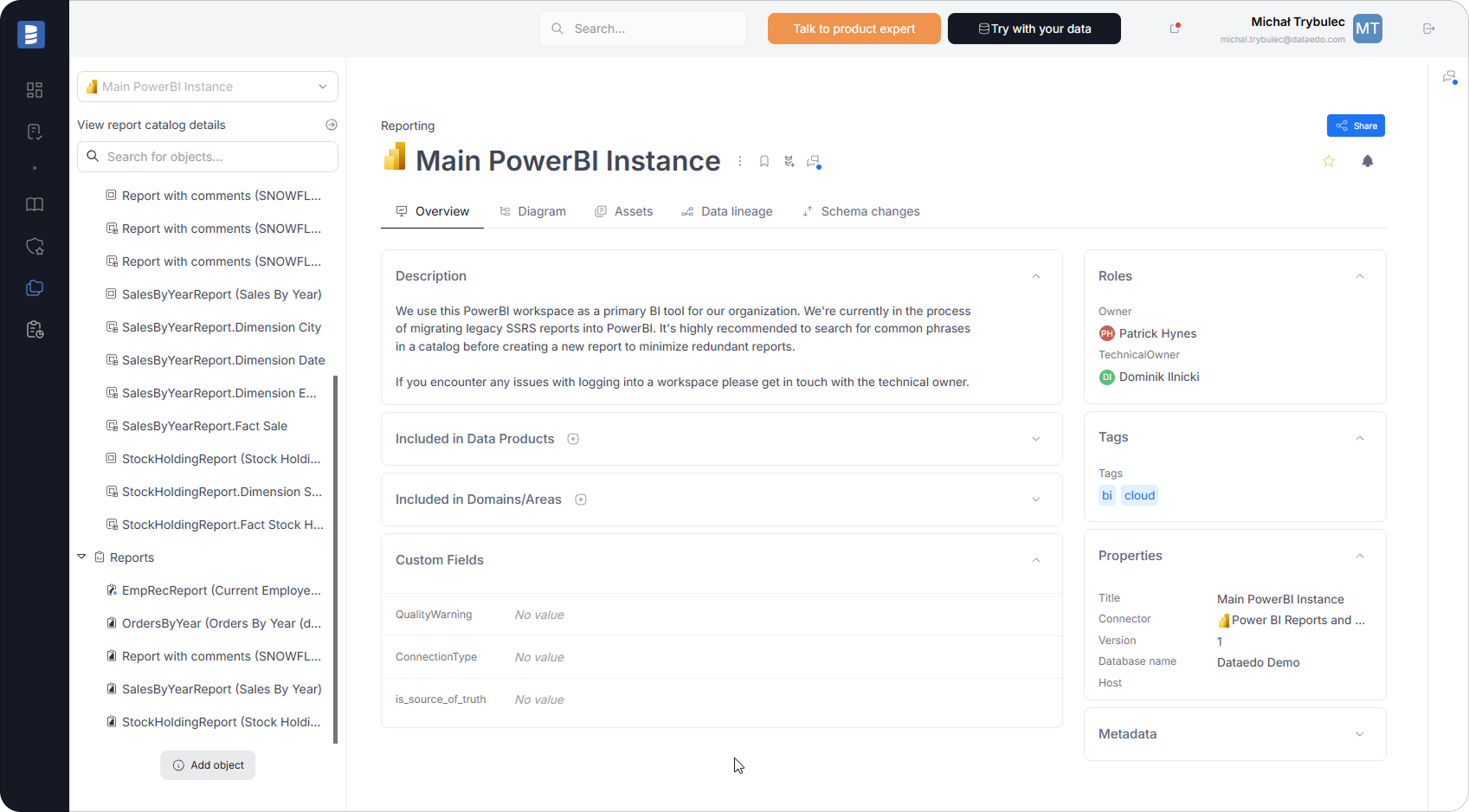
Dataedo is not limited to SSIS packages. It also documents:
- database schemas, keys, and constraints
- views and stored procedures
- staging, dimension, and fact tables
- Power BI datasets, reports, and DAX
This creates a single metadata repository for the entire data ecosystem.
4. Business Glossary & Governance Context
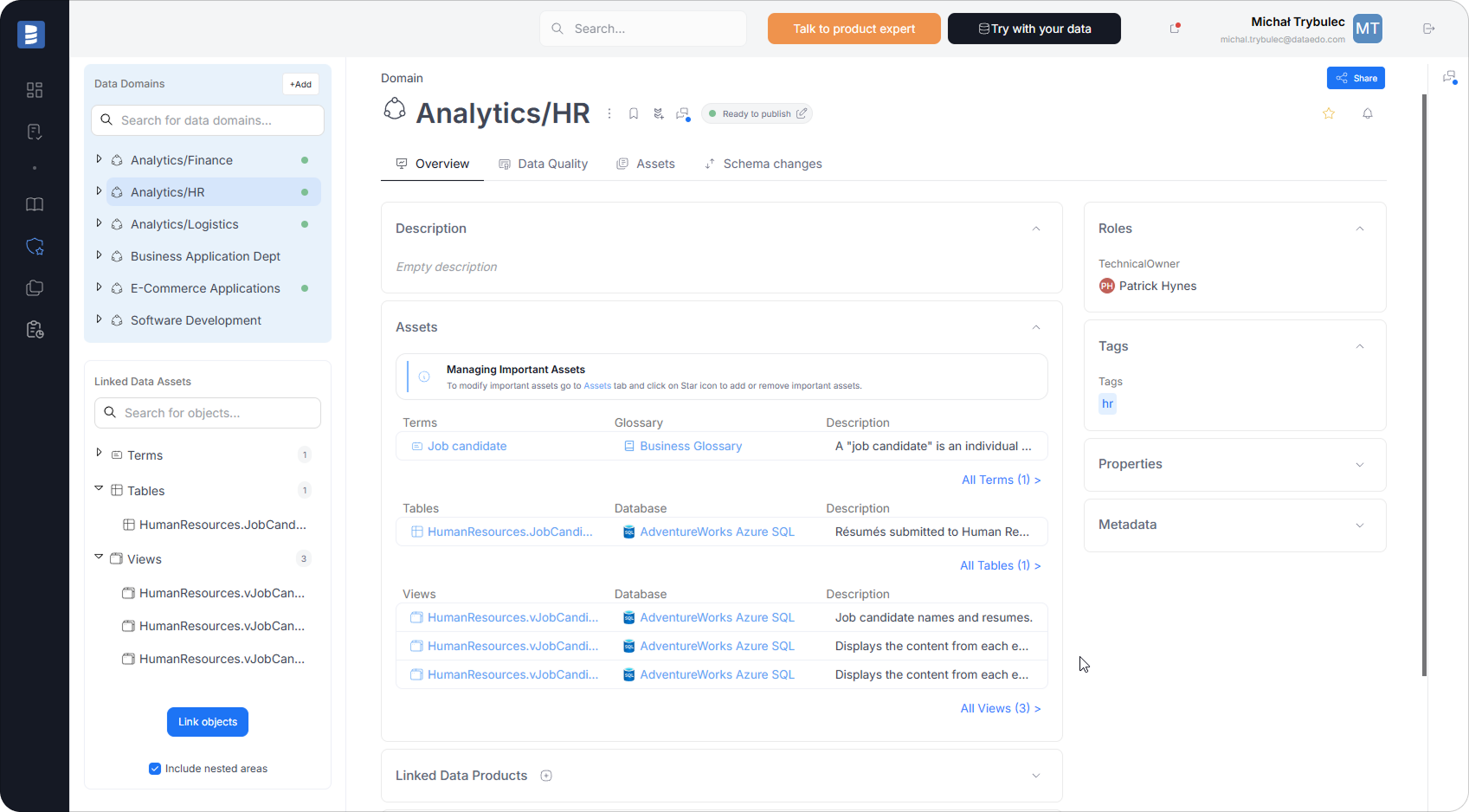
Dataedo lets you define business terms such as:
- Profit
- Customer Status
- Sales Margin
and link them to SSIS transformations, warehouse columns, and BI measures.
You can also enrich lineage with:
- ownership and stewardship
- domain and sensitivity tags
- refresh and load notes
- data quality rules
5. Publish & Share Lineage
All documentation and lineage diagrams can be published as a web-based data catalog.
This makes lineage easily accessible to data engineers, analysts, and auditors - without requiring access to SSIS or SQL Server.
8. Example Scenarios Where Dataedo Solves Real Problems
Schema Change
Someone wants to rename CityID in the source.
With Dataedo, you instantly see:
- which SSIS packages reference it
- which dimensions/facts depend on it
- which BI fields rely on those tables
Safe changes become possible.
Data Quality Issue
Fact.Sales has missing Profit values.
Lineage reveals:
- which lookup or derived column failed
- whether SSIS read the correct source data
- whether DW transformation logic was applied correctly
Compliance Audit
Auditors ask where customer contact data flows.
Dataedo traces:
SQL → SSIS → DW → BI
… in one click.
Modernization
Migrating SSIS to ADF or Fabric?
Lineage gives you:
- a full blueprint of existing ETL logic
- transformation dependencies
- cross-package logic
No guesswork.
9. Summary: SSIS Lineage Is Essential - and Dataedo Makes It Practical
SSIS data lineage is critical for:
- impact analysis
- safe schema changes
- troubleshooting
- governance
- compliance
- trust in BI
- modernization projects
But SSIS provides no native lineage viewer, and manual lineage mapping is unsustainable.
A dedicated SSIS data lineage tool such as Dataedo gives you:
✔ automated extraction of SSIS metadata
✔ column-level lineage
✔ SQL → SSIS → DW → BI mapping
✔ business glossary integration
✔ governance & ownership context
✔ publishable documentation
Dataedo turns SSIS from a black box into a transparent, documented, governed ETL ecosystem.
Book a demo or start a free trial to see how it works.