 Support


Redesigned ERDs
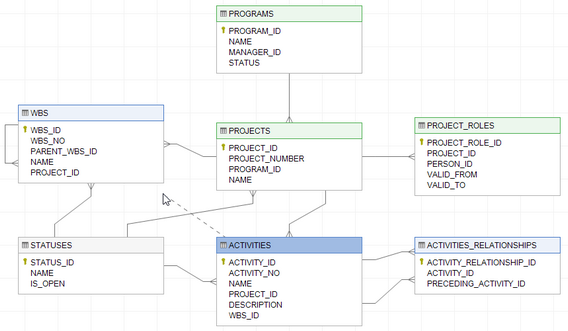
The most significant development in Dataedo 5.1 are ERDs. We redesigned this functionality and added many new features. We believe it is a mature metadata tool that will help you to document your databases with ERDs and Data Dictionaries in one repository.
What is new
- Ability to show columns
- Improved editor: scrolling, object chooser, menus and forms
- Improved drawing links
- Ability to add any table/view from database
- Ability to hide relation
Other changes
Here are most of the things we updated since 5.0:
- Fixed documenting Azure databases
- Support for SQL Server 2016
- Added email and comments fields in crash report form
- Simplified repository installation
- Downgraded required db privileges
- Improved search feature
- Many UI improvements
- Many bug fixes
Tutorial: ERDs with Dataedo
Check this tutorial that will show you how to use power of Dataedo 5.1:
How to Visualize Database Schema with ERD with Dataedo
Upgrade
Dataedo 4 and 5.0 users
If you are a user of previous versions you can easily upgrade to 5.1. Upgrade requires installation of new version and upgrade of repository. Here is a short tutorial:
Dataedo 5 Perpetual License holders
If you are a Dataedo 5 Perpetual License holder you are entitled to this and all 5.x updates. Just download and upgrade software and repository - your keys don't need update.
Dataedo 1 Year License holders
If you are a Dataedo 1 Year License holder you are entitled to all the updates so just download and upgrade Dataedo software and repository.
Try it
If you don't hold a license and your trial has expired, no worries - get new here:
