 Support


Data teams often treat data catalog and data lineage as if they were interchangeable. They are not. A data catalog helps people find, understand, and govern data assets. Data lineage helps them see how data moves, transforms, and affects downstream objects. In practice, teams need both. Discovery without flow leaves change risk hidden. Flow without business context leaves people unsure which asset they should trust or reuse.
If your team only has a catalog, you may know what data exists, but not what breaks when it changes. If your team only has lineage, you may see flows, but not have the business context needed to trust or reuse the data well.
In Dataedo, catalog, glossary, and lineage are designed to work together, not as separate islands.
Teams usually ask questions like:
- Where is this data coming from?
- What does this table or report actually mean?
- Which dashboards or models will be affected if we change a column?
- Who owns this data asset?
- How do we keep business definitions and technical metadata aligned?
In this guide, you’ll learn:
- what a data catalog is and what it is for,
- what data lineage is and what it is for,
- the practical difference between the two,
- when to use each one,
- and how Dataedo combines catalog, glossary, and lineage in one workflow.
What Is a Data Catalog?
A data catalog is the inventory layer.
It organizes data assets so people can find them, understand them, and work with them consistently. In practice, that usually means tables, views, reports, datasets, procedures, and related metadata are collected in one searchable place.
A good catalog answers questions such as:
- What assets do we have?
- What does this object mean?
- Who owns it?
- What tags, classifications, or business terms apply?
- Where should a user start when looking for trusted data?
In Dataedo, the catalog is more than a list of objects. It includes descriptions, report cataloging, custom fields, and governance context tied directly to the documented assets.
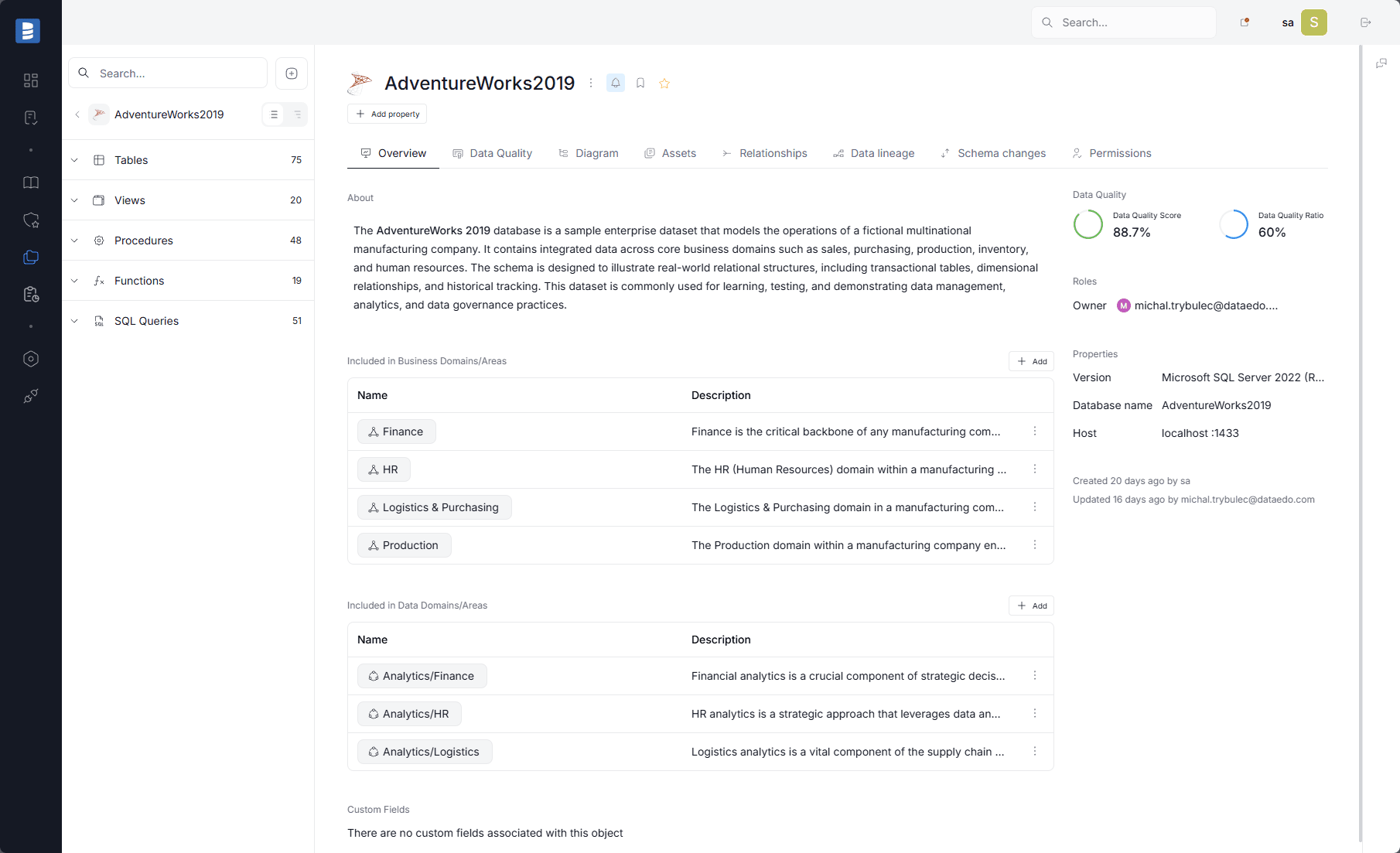
Documented asset page showing description, ownership, quality signals, and related governance context in the catalog.
What Is Data Lineage?
Data lineage is the flow layer.
It shows how data moves from source to destination and how transformations affect downstream objects. That can be object-level, column-level, source-level, or system-level, depending on how much detail you need.
Lineage answers questions such as:
- Where did this field come from?
- What transformed it?
- What depends on it downstream?
- What will be affected if we change it?
- How far does this data flow across systems?
In Dataedo, lineage can be automated from metadata imports, extracted from SQL, or configured manually when needed.
Data Lineage vs Data Catalog
The easiest way to separate them is this:
- The catalog tells you what exists.
- The lineage tells you how it moves.
They solve different problems, but they are strongest together.
| Topic | Data Catalog | Data Lineage |
|---|---|---|
| Primary purpose | Inventory and understanding | Trace flow and dependencies |
| Main question | What is this asset? | Where does it come from and where does it go? |
| Best for | Discovery, governance, documentation | Change safety, troubleshooting, impact analysis |
| Typical objects | Tables, views, reports, terms, domains | Source systems, processors, columns, flows |
| Main value | Shared context | Visibility into change impact |
| User outcome | Find and trust the asset | Understand downstream effects |
Catalog without lineage gives you context, but not dependency awareness. Lineage without catalog gives you flow, but not an easy way to standardize meaning or discovery.
| Catalog | Lineage |
|---|---|
|
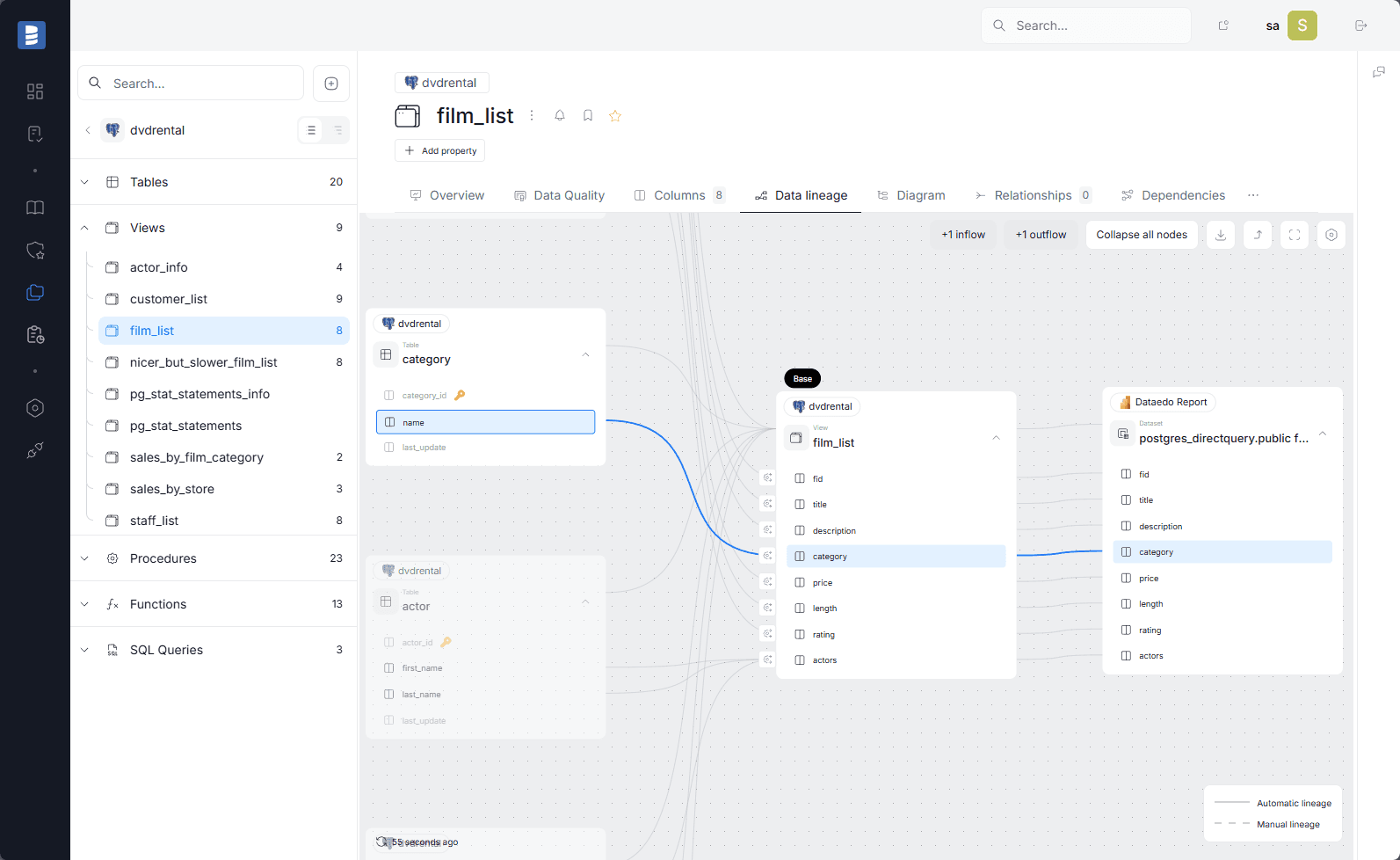 |
| Catalog context: documented asset page showing description, ownership, quality signals, and governance metadata. | Lineage context: column-level lineage view showing upstream sources, transformations, and downstream analytical use. |
That leads to a simple rule:
- start with the catalog when the problem is discovery, ownership, and shared understanding,
- start with lineage when the problem is change risk, troubleshooting, and downstream impact,
- and use both when the team needs to decide whether data is both trustworthy and safe to change.
When Each One Matters Most
Use a catalog when the problem is discovery and understanding.
You need a catalog when teams cannot quickly answer:
- What data do we have?
- Which object is the right one to use?
- Which term or definition should we trust?
- Which reports are official?
Use lineage when the problem is change, troubleshooting, or dependency analysis.
You need lineage when teams cannot quickly answer:
- What breaks if we rename this column?
- Which report depends on this dataset?
- How did this metric get calculated?
- Where did this value originate?
In real projects, the two problems usually show up together.
Practical Examples
Example 1: A new analyst needs the right sales metric
The catalog helps the analyst find the correct table, report, and business definition.
The glossary helps them confirm that “net revenue” means the same thing across teams.
The lineage helps them see which source systems and transformations feed the metric.
Without the catalog, the analyst may never find the right asset. Without lineage, the analyst may find it but still not trust how it was built.
Example 2: A developer plans a column change
The catalog tells the developer which table, report, and glossary terms are attached to the object.
The lineage shows which downstream datasets, reports, and fields will be affected.
That is the difference between “we changed a column” and “we understand the blast radius before release.”
Example 3: A governance team standardizes definitions
The catalog provides the governed place where terms and domains live.
The glossary gives a shared business vocabulary.
The lineage connects those definitions to actual technical assets.
That makes the definitions useful instead of theoretical.
Why Teams Need Both
If you are building a modern data environment, a catalog and lineage complement each other in four ways.
- Discovery becomes faster because users can search for assets and not guess where data lives.
- Trust improves because users can connect business meaning to technical flow.
- Change management becomes safer because downstream dependencies are visible.
- Governance becomes operational because definitions, ownership, and impact are tied to actual assets.
In short, the catalog makes data discoverable. Lineage makes it change-aware.
Common Mistakes
- Treating a catalog as a complete governance solution - A catalog helps people find and understand data, but it does not automatically show dependency chains.
- Treating lineage as a standalone governance solution - Lineage is crucial for impact analysis, but it does not replace a shared business glossary or a structured catalog.
- Keeping business and technical metadata separate - If terms are not linked to assets, teams keep repeating the same questions and making decisions from tribal knowledge.
- Documenting once and never updating - Both catalog and lineage lose value if they are not refreshed as schemas, reports, and transformations change.
How Dataedo Brings Catalog, Glossary, and Lineage Together
Dataedo is built around the idea that discovery, meaning, and flow should live in the same product.
The catalog organizes and documents assets. The glossary standardizes terms, policies, and rules. The lineage shows how data moves across systems and where changes will ripple.
That combination matters because it lets teams move from:
- finding an asset,
- to understanding it,
- to safely changing it.
Dataedo also supports report cataloging, ownership metadata, schema change tracking, data quality signals, and governance workflows, so the catalog is not just a static inventory.
And because lineage is visible alongside those objects, teams can connect the business and technical layers without switching tools.
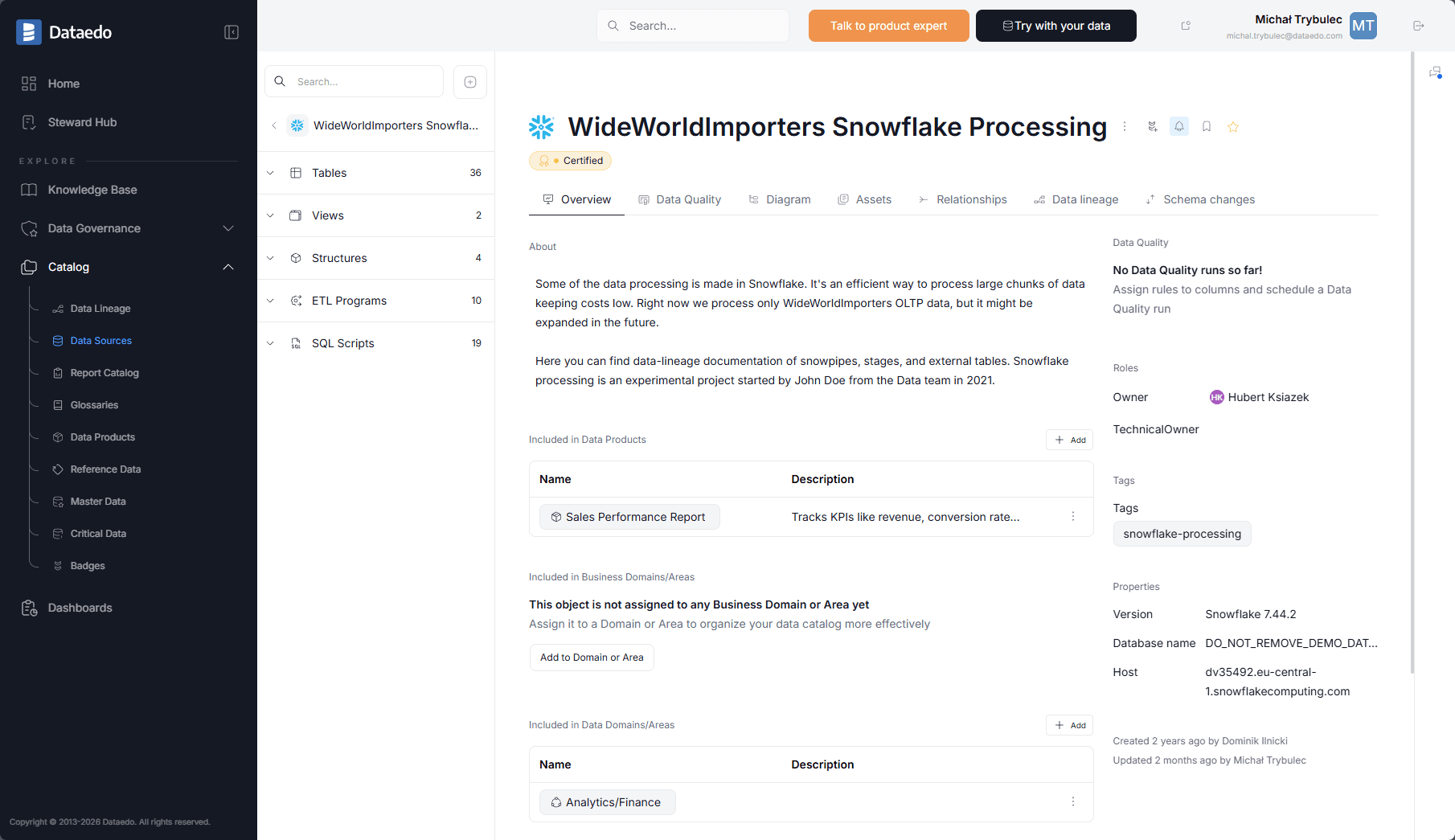
Documented object page showing catalog context, ownership, and direct access to lineage and related governance details on the same asset.
FAQ
Is data lineage part of a data catalog?
Often they are related, but they are not the same thing. A catalog focuses on inventory and context. Lineage focuses on flow and dependency visibility.
Can a data catalog replace lineage?
No. A catalog can help users find data and understand it, but it does not by itself show full downstream impact.
Can lineage replace a catalog?
No. Lineage is not a substitute for business definitions, object discovery, ownership, and structured metadata management.
What should teams build first?
Start with the use case that hurts most. If people cannot find or understand data, start with the catalog and glossary. If change risk is the main issue, add lineage early.
Final Takeaway
Data catalog and data lineage solve different problems.
The catalog helps teams find and understand data. Lineage helps teams trace, trust, and change it safely.
Dataedo works best when both are used together with a business glossary in the middle.
-> See how Dataedo combines catalog, glossary, and lineage to help teams find trusted data and understand downstream impact before they make changes. Try now or book a demo.
