 Support

Join 1000+ Satisfied Customers Using Dataedo
















See what breaks before you change anything
Schema changes, platform migrations, and table refactoring always carry risk. Dataedo shows you exactly which reports, dashboards, ETL jobs, and applications depend on any table or column, so you can make changes confidently without breaking production.
The challenge

Data changes
Teams need to rename columns, modify data types, or retire tables as systems evolve.
Unknown downstream impact
Without visibility, it’s unclear which reports, dashboards, or processes will break after a change.
Manual dependency checks
Analyzing data dependencies manually takes days and still leaves gaps in understanding.
Production surprises
Untracked changes lead to broken pipelines, failed reports, and emergency rollbacks.
How Dataedo helps
Map all downstream dependencies
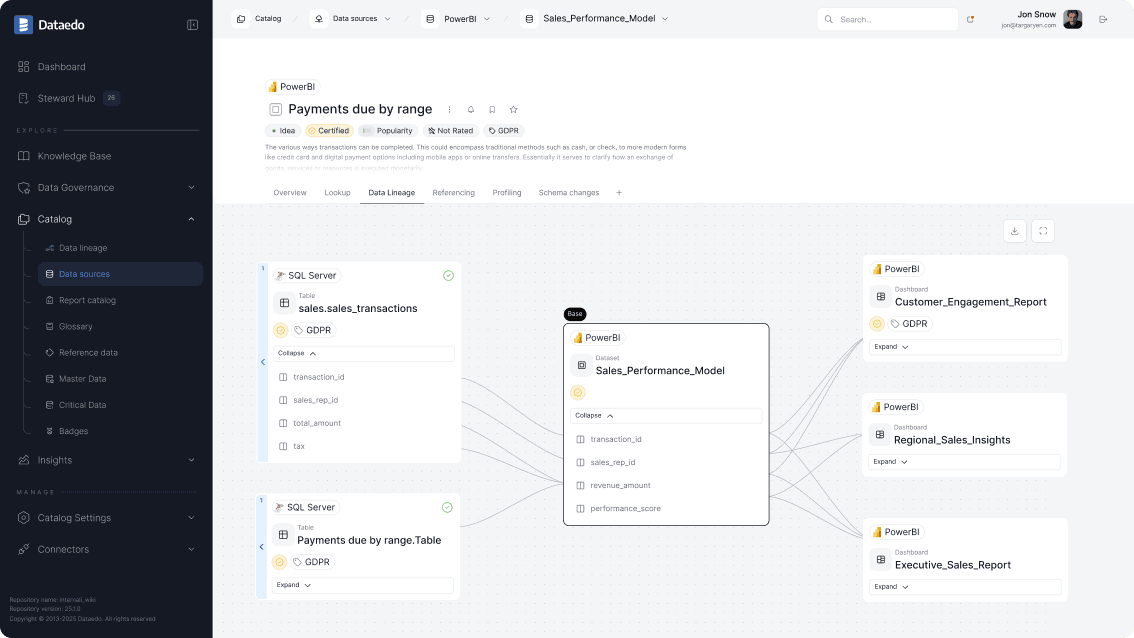
Use Data Lineage to see all reports, dashboards, views, stored procedures, and ETL jobs that depend on any table or column. Get complete visibility into downstream usage.

Perform impact analysis before changes
Use lineage diagrams to identify downstream tables, reports, and processes affected by schema or data changes, helping teams safely plan updates before they reach production.

Document dependencies and scripts
See stored procedures, views, and ETL code that reference specific tables. Understand the logic and transformations that will need updating after your change.

Share impact assessments with stakeholders
Export lineage diagrams and dependency lists. Use them in change approval meetings to demonstrate you've considered all downstream effects.

What you get

Confident changes
Understand exactly what will be affected before modifying data structures or pipelines.
Fewer production incidents
Prevent unexpected failures in reports, dashboards, and downstream processes.
Faster approvals
Provide clear impact visibility to change boards and stakeholders to speed up decision-making.
FAQs
What is impact analysis?
Impact analysis is the process of identifying which reports, dashboards, pipelines, and datasets will be affected by changes to databases, tables, or columns before those changes are implemented
Why is impact analysis important before making data changes?
Without impact analysis, schema updates or table modifications can unintentionally break downstream analytics and business processes. Understanding dependencies helps teams make safe, controlled changes.
How does data lineage support impact analysis?
Data lineage maps relationships between source systems, transformations, and downstream assets. This visibility allows teams to quickly see where data is used and assess the impact of proposed changes.
Can impact analysis prevent broken dashboards and reports?
Yes. By identifying affected dashboards, reports, and pipelines in advance, teams can update dependencies before deployment and avoid production incidents.
How does impact analysis support data governance?
Impact analysis provides documented evidence of dependency checks and risk assessment, helping organizations follow governance processes and safely manage data lifecycle changes.
Why our customers love Dataedo?
Dataedo is a lightweight solution with great customer service and active product development (recently data quality). The ability to run SQL scripts on the repository brings additional flexibility.

We jump started all of our Data Governance efforts using the tool. We documented key databases quickly and easily and published the information to our analyst community. The Dataedo team is dream to work with and very responsive.

Dataedo is easy to use, offers great functionality, and provides excellent customer service that always listens to the customer.

Dataedo is an amazing tool that continues to grow and improve.

Dataedo excels at data cataloging, and the support from the Dataedo team is top-notch.

Datedo consistently improves while delivering exceptional support that is quick, competent, and highly reliable.

Dataedo provides ease of use and covers so many areas from a Data Governance perspective. You really can put everythng in one place.

Dataedo is a fantastic tool, and I love working with it—especially with the continuous improvements being made and planned.


Piotr Kononow
Founder
See what breaks before you change anything
Explore Dataedo through a preconfigured data catalog with sample data, try it with your own data during a 14-day free trial, or book a demo.