


 Michał Trybulec
SQL Server often sits at the center of analytical and operational reporting workflows. As environments grow, teams rely on views, stored procedures, functions, synonyms, linked servers, and external data paths. Without lineage, dependency mapping becomes manual, slow, and risky.
In this guide, you’ll learn:
- what automatic SQL Server lineage means in practice,
- what coverage to expect across common SQL Server objects,
- where parser- and metadata-based lineage has limits,
- and how Dataedo helps teams use lineage for safer change decisions.
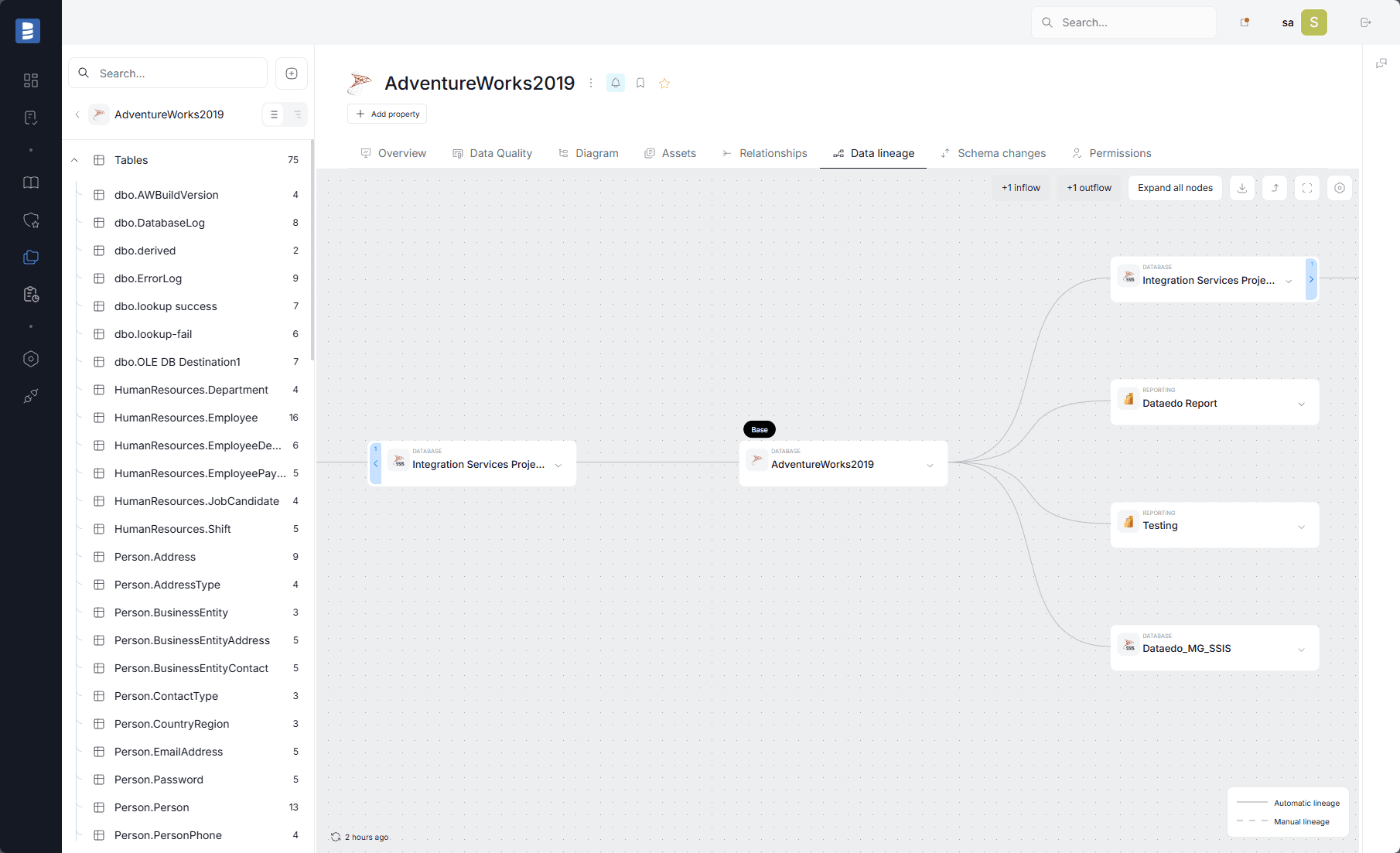 SQL Server lineage view in Dataedo showing upstream and downstream dependencies across database and analytics assets.
What Automatic Lineage in SQL Server Actually Means
Automatic lineage is the ability to discover and visualize dependencies from imported metadata and SQL scripts instead of manually maintaining diagrams.
In SQL Server environments, this usually means tracing data flow:
- from upstream ETL or integration processes feeding SQL Server,
- from tables to views,
- through stored procedures and functions,
- through result sets returned by procedures/functions (represented as SQL Query objects),
- into downstream reporting and BI layers (for example Power BI, SSRS, or semantic models).
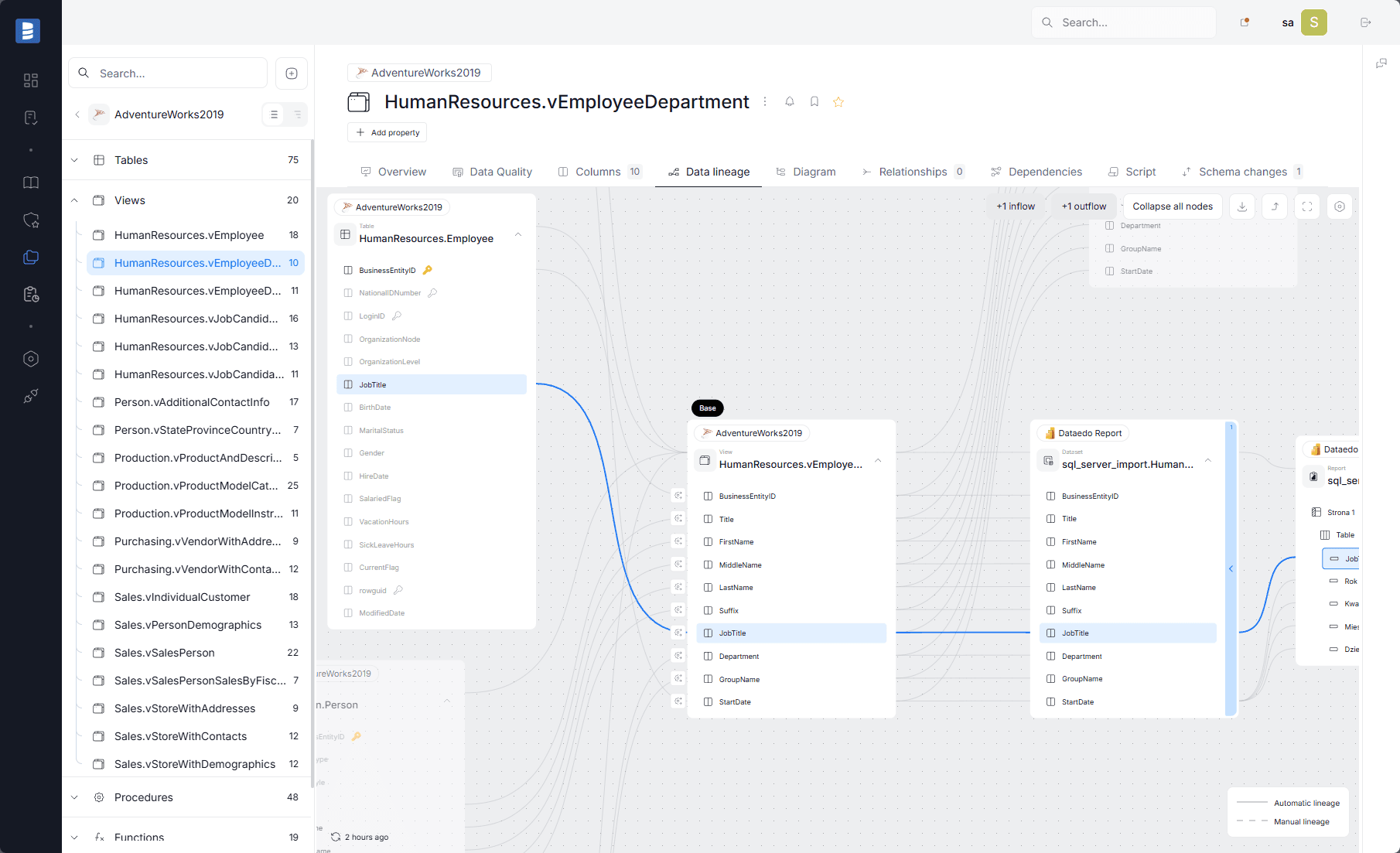 SQL Server lineage example showing procedures/functions as processors between source tables and downstream analytical outputs.
Why SQL Server Teams Need Automatic Lineage
Manual dependency tracking fails quickly when:
- schemas change frequently,
- business logic is distributed across views and routines,
- multiple teams reuse shared database objects,
- reporting deadlines leave little time for manual impact analysis.
Common symptoms:
- unexpected report breaks after releases,
- long root-cause analysis cycles,
- low confidence in schema change impact,
- repeated reliance on tribal knowledge.
How SQL Server Lineage Is Built
In Dataedo, SQL Server lineage is built by combining:
- imported SQL Server metadata,
- dependency metadata (for object-level relationships),
- T-SQL parsing for object- and column-level lineage,
- Linked Source mappings for cross-database and linked-server scenarios.
For stored procedures and functions, Dataedo divides script logic into process-like steps.
Important behavior to understand:
- lineage is created only for supported statements,
- unsupported statements appear as separate steps named after the first keyword and ending with ...,
- this is visible in the lineage configuration context in Desktop.
If a stored procedure or function returns a result set, Dataedo can create a SQL Query object representing the output. The procedure/function acts as a processor in lineage between inputs and the SQL Query output.
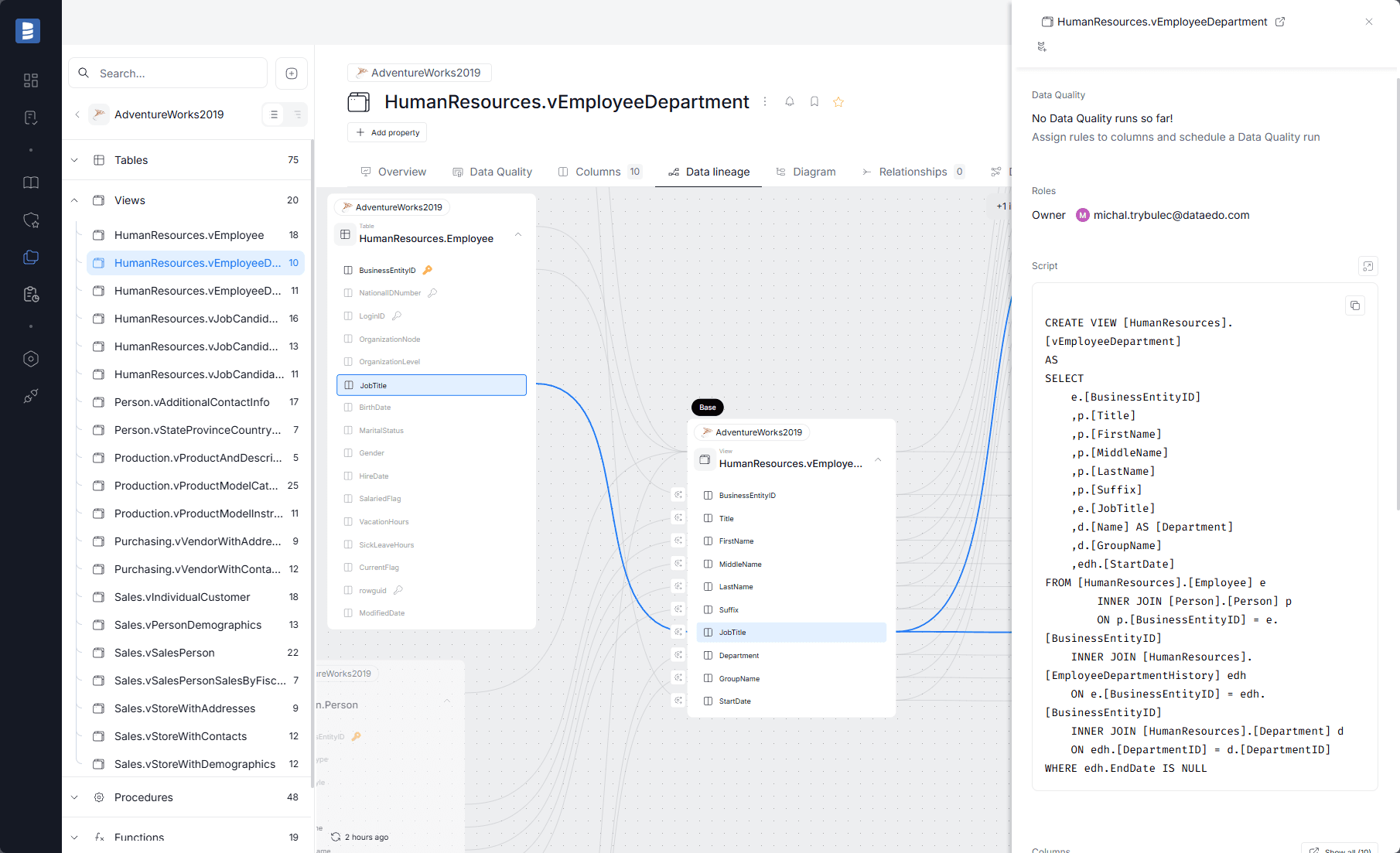 Dataedo lineage details showing parsed T-SQL script context linked to a selected dependency path.
Coverage: What Usually Works Well
Tables and Views
For most SQL Server analytics use cases, views are the strongest lineage area because Dataedo can parse T-SQL view definitions and build column-level lineage.
This supports:
- object-level dependencies,
- column-level flow mapping,
- safer impact analysis for field-level changes.
Stored Procedures and Functions
SQL Server lineage can also cover stored procedures and functions based on script parsing.
This is especially useful for:
- transformation procedures,
- table-valued functions,
- routine-based logic reused by reporting or ETL.
SQL Queries Returned by Procedures and Functions
Dataedo can also build lineage when a stored procedure or function returns a result set, not only when logic is exposed through tables or views.
This is especially useful when procedure-based outputs are consumed by reporting or BI tools. In practice, it means teams can still trace how data flows from source objects, through the routine logic, and into downstream analytical use cases even when the procedure itself is the data-serving layer.
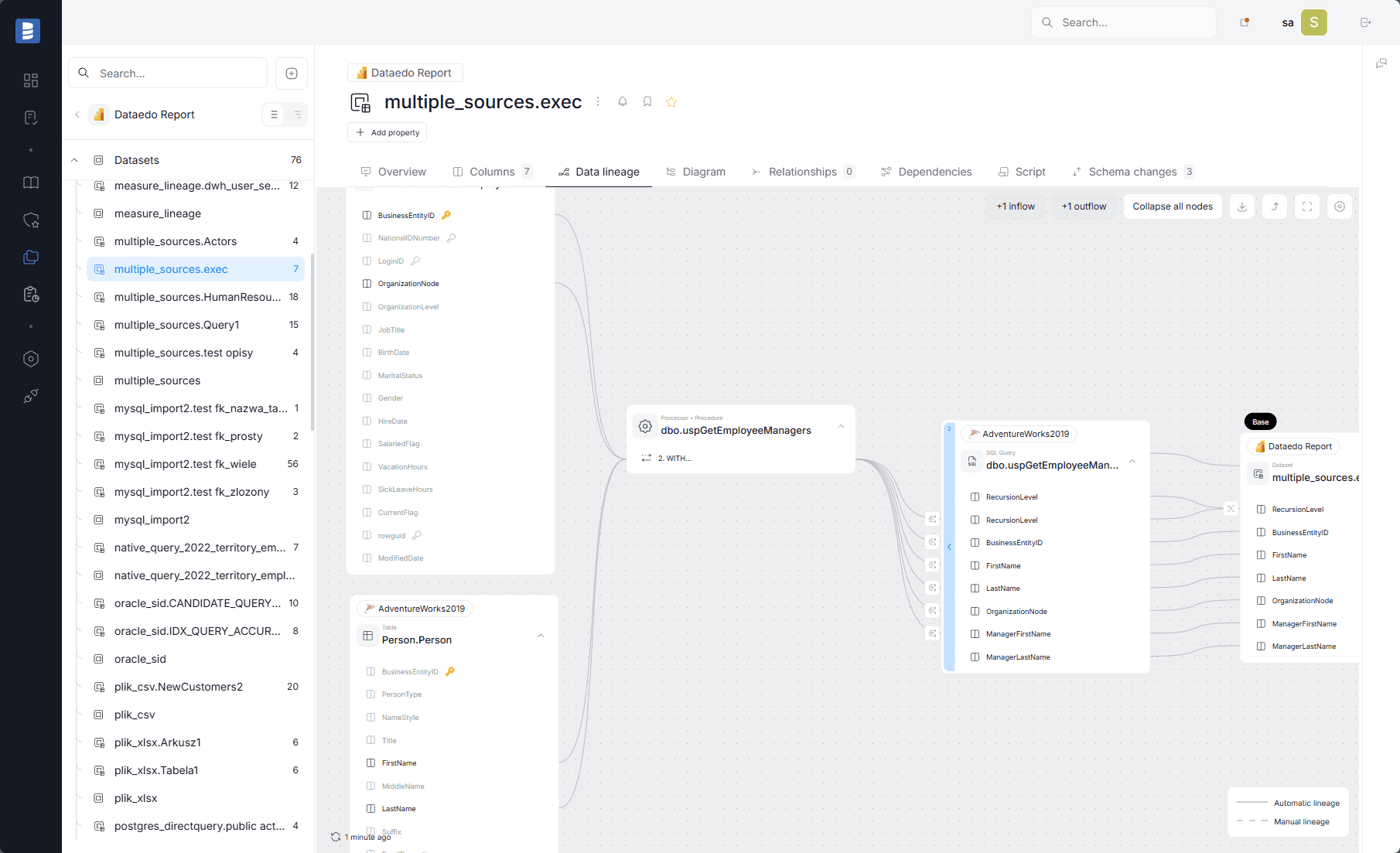 Column-level lineage view showing SQL Server source columns flowing through views or routines to downstream fields.
Synonyms (Including Cross-Database / Linked Server Cases)
Dataedo supports lineage for synonyms when the base object is documented.
This can include synonyms pointing to:
- objects in the same database,
- objects in another database on the same server,
- objects on linked servers (including non-SQL Server linked DBMS), provided mappings and documentation are set correctly.
Polybase (External Tables)
For Polybase connections, Dataedo can build object-level lineage.
This helps teams understand external data dependencies without overstating transformation-level detail.
Cross-System and End-to-End Context
Lineage becomes more valuable when SQL Server lineage is connected to upstream ETL/integration tools and downstream BI assets.
In practice, this supports end-to-end impact analysis such as:
- ETL/ingestion -> SQL Server transformations -> Power BI datasets/reports,
- SQL Server routines -> semantic layer -> dashboards,
- source databases -> SQL Server marts -> operational reporting.
Where Automatic Lineage Has Limits
Typical limitations include:
- dynamic SQL and runtime-generated statements,
- unsupported T-SQL syntax in parser-covered routines,
- partial parsing when unsupported elements interfere with supported steps,
- missing Linked Source mappings for cross-database or linked-server lineage,
- undocumented base objects behind synonyms,
- transformations implemented outside documented SQL layers.
A practical rule: automatic lineage should be the baseline, then enriched with governance review for critical release paths.
Object-Level vs Column-Level in SQL Server
Object-level lineage supports architecture visibility. Column-level lineage supports production change safety.
Use both:
- object-level to understand broad dependency scope,
- column-level to assess field-level impact before changes go live.
How Dataedo Helps with SQL Server Lineage
Dataedo helps teams operationalize SQL Server lineage through:
- SQL Server metadata cataloging,
- object-level and column-level lineage,
- T-SQL parser support for views, procedures, and functions,
- SQL Query objects for returned result sets from routines,
- synonym and Polybase lineage support,
- cross-system lineage context when ETL and BI assets are documented and linked,
- lineage details with script-level dependency context for validation.
Frequently Asked Questions
Does SQL Server lineage cover stored procedures and functions?
Yes. Dataedo docs explicitly describe lineage support for both stored procedures and functions, with coverage depending on parser-supported syntax.
Are table-valued functions included in lineage analysis?
Yes. They are specifically useful because they can fully participate in lineage when their logic is supported and documented.
Can SQL Server lineage include synonyms and linked server scenarios?
Yes, but only when the base objects are documented and Linked Source mappings are correctly configured.
Is object-level lineage enough for SQL Server change management?
Usually no for critical production changes. Column-level lineage is often required.
What is the biggest SQL Server lineage anti-pattern?
Using lineage only after incidents instead of making it part of release and change review workflow.
Final Takeaway
Automatic lineage in SQL Server is more than a visualization feature. It is a practical control for safer changes.
Teams that combine lineage with ownership, glossary, and quality context make faster and lower-risk release decisions.
See how Dataedo helps teams map SQL Server lineage and run impact analysis before downstream analytics break. Book a demo or start a free trial.